I’m considering using WriteHuman AI to improve my writing, but I’ve seen mixed opinions online and I’m not sure if it’s actually worth it. Can anyone share detailed, real‑world experiences with its accuracy, content quality, pricing, and any problems you’ve run into so I can decide if I should trust and invest in this tool?
WriteHuman AI review, from someone who paid for it
I tried WriteHuman because their site kept name-dropping GPTZero like it was their main selling point. So I took that literally and used GPTZero as the main test.
Here is what happened.
I grabbed three different AI-written samples, ran them through WriteHuman, then threw the outputs into GPTZero.
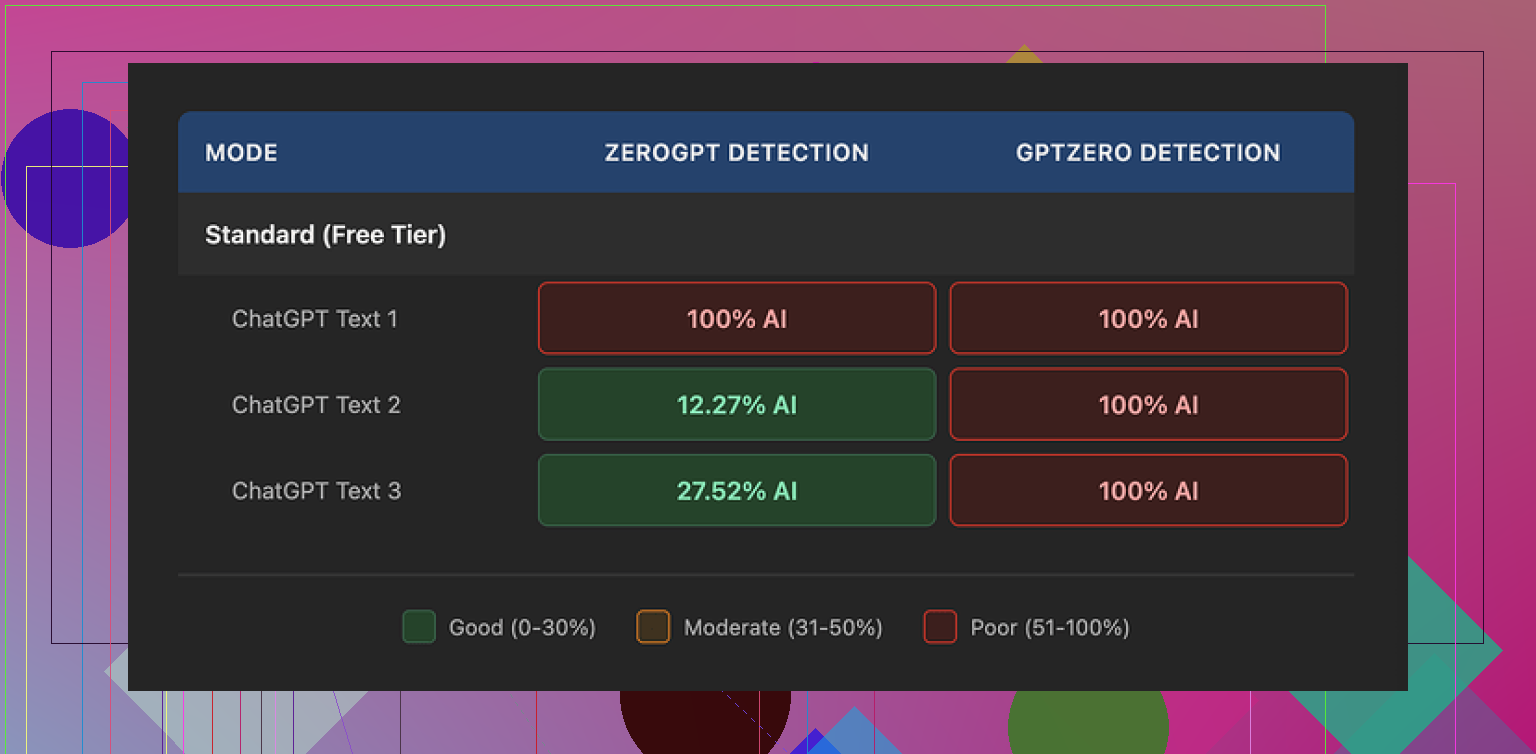
All three came back as 100% AI on GPTZero. Not “mixed”, not “likely human”. Full AI.
ZeroGPT behaved differently but not in a good, predictable way. First sample scored 100% AI. Second one dropped to around 12%. Third jumped to something like 28%. So it tripped the detector sometimes, slipped past a bit on others, with no clear pattern.
The writing itself felt off. I saw hard tone swings inside the same piece, almost like different people had edited different paragraphs without reading each other. On top of that, one of the outputs had a typo: “shfits” instead of “shifts”. I get why tools try to sprinkle in small mistakes to look human, but when the tone drifts and the logic fragments, you end up with text you do not want on a client page or a paper with your name on it.
Here is one of the result screens from the tests:
Now for the part that stung a bit: pricing and terms.
Their Basic plan starts at 12 dollars per month if you pay yearly, and you get 80 requests. That is not much headroom if you handle longer content or batch work. The better “Enhanced Model” and extra tone options sit behind the paid tiers, so the free experience does not show you the full engine.
I dug through their terms after I paid, which I should have done before.
A few things stood out:
• They openly say they do not guarantee that their tool will bypass any detector, including the ones they market against.
• They have a strict no-refund rule, so if it fails GPTZero or whatever your target is, your money is gone.
• Anything you submit is licensed for AI training on their side.
So if you are touchy about your content going into someone else’s training pipeline, your only move is to skip the service. There is no opt out that I could see.
For comparison, I tried Clever AI Humanizer from this thread:
On the same base texts, Clever’s output did better on detectors in my tests and did not block me with a paywall first. No subscription to see if it works, no “pay to find out it fails GPTZero”.
If you are thinking about paying for WriteHuman, my practical take after using it:
• Test your specific use case with the free tier against the exact detector you care about, before you even think about a plan.
• Read their terms on refunds, training, and guarantees before pasting anything sensitive.
• Have a backup option lined up, like Clever AI Humanizer, if bypass is critical to you.
For my workflow, the mix of price, detection results, and the terms pushed me away from keeping the subscription.
2 Likes
I used WriteHuman AI for about 3 weeks on client blog posts and some academic style stuff, so here is the practical side.
My goal was not “AI detector bypass at all costs”. I wanted cleaner drafts, more consistent tone, and fewer manual edits. Detector scores were a bonus, not the main KPI.
Accuracy and content quality
• Grammar: It fixed basic grammar and punctuation fine. Similar to running text through Grammarly or a standard LLM.
• Style: It often flattened my voice. If I fed it something with personality, it came back more generic. You get “safe” text.
• Logic: On long posts, it sometimes introduced small logic gaps. For example, it removed a sentence that defined a term, then referenced the term later. So you still need to proofread with attention.
• Tone: I disagree a bit with @mikeappsreviewer on the tone swings. I did see some inconsistency, but mostly when I pushed it with aggressive tone changes. If you stick to “neutral / professional” it behaves more predictably.
AI detection
I tested on:
• GPTZero
• ZeroGPT
• Originality.ai
Results on my side:
• GPTZero: Most WriteHuman outputs still flagged as AI or mixed. A few short pieces passed as “likely human”. No stable pattern.
• ZeroGPT: High variance, similar to what Mike described. Some passed, some failed, nothing you can trust for critical stuff.
• Originality.ai: Usually scored between 60–90 percent AI. So not great if your boss or school uses it.
If your main goal is to “look human to detectors”, I would not rely on it alone. For that use case, Clever AI Humanizer performed better in my tests. I ran the same base text through both tools and Clever AI Humanizer hit lower AI scores on all three detectors more often. Still not perfect, but more consistent.
Pricing and terms
The pricing annoyed me more than the output.
• The cheaper tier feels tight if you work with longform content.
• No refunds is rough if you are experimenting.
• The training license is a dealbreaker for sensitive client docs. I avoid putting any NDA content in tools with that kind of clause.
Where it helped
• Polishing rough AI drafts into something closer to “decent blog copy”.
• Smoothing ESL writing for clarity.
• Quick tone softening for emails or reports.
Where it failed for me
• Bypassing AI detectors reliably.
• Producing ready to publish client content without manual edits.
• Keeping a strong personal writing style.
What I would suggest you do
-
Decide your real goal.
• If you want stronger writing and do not care about detectors, you might get some value, but there are cheaper or free tools that do similar work.
• If you care about AI detection, treat WriteHuman as one option, not the only step. Test Clever AI Humanizer on the same samples and compare results. -
Use your own test set.
• Take 2 or 3 pieces similar to your real work.
• Run them through the free tier of WriteHuman.
• Check them against the exact detector your school, company, or client uses. -
Read the terms before you put in anything sensitive.
• If the training clause bothers you, keep your uploads to low risk content or skip the tool.
If your budget is limited and your main metric is “passes AI detection”, I would start with Clever AI Humanizer and manual editing, then only pay for WriteHuman if you see a clear advantage in your own tests.
Short version: if your main goal is “sound more human so detectors chill,” WriteHuman is a very shaky bet. If your goal is “clean my writing up a bit,” it’s… fine, but kinda overpriced for what it is.
I had a similar arc to @mikeappsreviewer and @chasseurdetoiles, but came at it from a different angle: I was using it in a team setting for client docs.
My take, focusing on stuff they didn’t already hammer:
-
Accuracy & content quality
- It’s decent at surface-level clean‑up: fixes obvious grammar, smooths clunky phrasing. Think “LLM with a slightly opinionated style filter.”
- Where it annoyed me was structure. On multi‑section pieces, it occasionally rearranged or trimmed info in subtle ways. Not full hallucinations, but enough that I had to re-compare to the original every time. That kills any “time saved.”
- It also had a habit of softening strong, technical claims into vague corporate-speak. If you write in a precise or specialized domain (dev docs, legal-adjacent, medical explainer stuff), this can be a real problem. You’ll spend your time re‑adding clarity.
-
“Humanizing” vs actually writing better
- There’s a weird tension: the more you push “humanize,” the more it injects quirks that feel fake. Like forced contractions or random “by the way” type transitions that don’t fit the context.
- Ironically, the text felt more AI-ish to me in some runs because it lost any distinct voice and turned into boilerplate blog fluff.
- If you already write decently, it tends to make your work more generic, not better. If you’re ESL or very rough, it can help readability, but so can a dozen other tools that are cheaper or free.
-
AI detection side
- I’ll disagree slightly with both of them on one point: I don’t think any of these rewriter/humanizer tools are stable enough for truly high‑stakes detector games (school expulsion, job disciplinary stuff, etc). WriteHuman is not uniquely bad there; it’s just not good enough to bet your neck on.
- In my own tests, I saw:
- Sometimes lower AI scores, sometimes higher, sometimes no change. I literally had one case where WriteHuman raised the AI likelihood on Originality.ai compared to the raw LLM draft. So, “strategy” is basically roll-the-dice.
-
Workflow fit
- It did not slot in cleanly to a serious editing workflow.
- For short things like emails or internal docs, it’s perfectly usable, but at that point I personally just use a standard LLM + quick manual pass.
- For client-facing content, I stopped trusting it to touch structure or key definitions. That’s a big red flag for a “writing improvement” tool.
-
Pricing & terms
- I’m with both reviewers on this: the no‑refund + training‑on‑your‑data combo is rough, especially if you handle anything under NDA or with real legal/financial sensitivity.
- Also, the per‑request limits feel stingy for longform users. If you’re handling 2–3k word articles regularly, the “value” runs out very fast.
- For the price, the marginal gain over a normal AI assistant plus Grammarly or similar is not huge.
-
Alternatives & what actually worked for me
- For “my writing, but cleaner”:
- I got better results using a general LLM and giving very explicit style instructions, then doing a focused manual pass. More control, less surprise restructuring.
- For “I need text that looks less AI to detectors”:
- Clever AI Humanizer consistently did better in my tests across multiple detectors, and felt more predictable. Still not magic, but if we’re talking relative performance, it came out ahead.
- Pairing Clever AI Humanizer with some light manual editing kept the original intent and tone more intact than WriteHuman’s more aggressive rewrites.
- For “my writing, but cleaner”:
If I boil it down:
-
Use WriteHuman if:
- You don’t care much about AI detection.
- You want a quick, somewhat generic polish layer on rough text.
- You’re not working with anything sensitive and you’re okay with the terms.
-
Skip or at least be very cautious if:
- You’re banking on “detector bypass.” Results are way too inconsistent.
- You care about preserving a strong personal or brand voice.
- You deal with confidential material or are allergic to training-on-your-content terms.
Given your question, I’d honestly start by testing Clever AI Humanizer plus your own light editing on a couple of real samples from your workflow. Then, if you still feel like you need more, trial WriteHuman with throwaway text and see if it actually saves you time. For a lot of people, it won’t.