I’m working on blog posts and school essays and need to rewrite sentences without changing the original meaning or triggering plagiarism detectors. I’ve tried a few free paraphrasing tools, but most either sound robotic, have strict word limits, or hide the good features behind a paywall. Can you recommend the most reliable free paraphrasing tool right now, preferably one that’s accurate, keeps a natural tone, and is safe for long-term use
I used QuillBot for a long time. It did what I needed, then one day most of the tones and styles sat behind a paywall. I hit the limit, got the upgrade popup again, closed the tab, and went looking for something else.
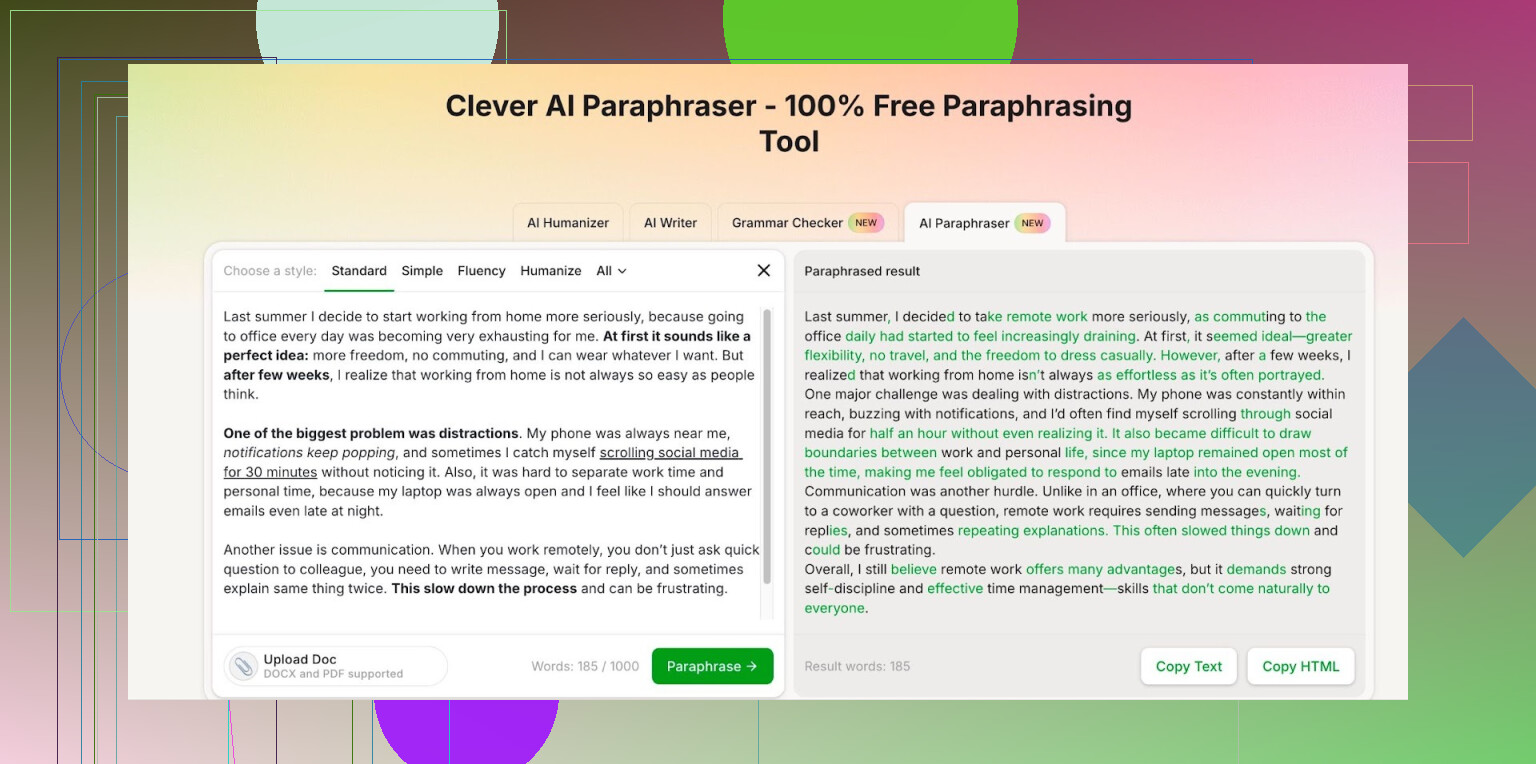
After poking around a bit, I landed on Clever AI Humanizer and stuck with this paraphraser:
Couple of things I noticed from using it for a few weeks:
-
The styles are not locked
I need different tones for different stuff, like making text more neutral for work reports or more casual for internal docs. On QuillBot I kept running into the “upgrade for tone” barrier. Here all the styles I tried were available without paying. -
The free limit is high enough for regular work
After logging in, my account shows:
• 7,000 words per day
• 200,000 words per monthI tested it against my real workload. For context, I usually rewrite:
• 500 to 1,500 words per task
• 5 to 10 tasks per weekI did not hit the cap once. You might hit limits if you bulk rewrite books or whole websites. For normal reports, blog rewrites, emails, research summaries and so on, the quota held up.
-
Output quality is close to paid tools
I ran a small test for myself:
• Took a 600 word paragraph from a technical doc.
• Ran it through QuillBot (paid friend sent me the output).
• Ran the same text through Clever AI Humanizer.What I watched for:
• Grammar errors
• Meaning drift
• Repeated phrasesBoth versions were fine on grammar. QuillBot felt slightly more conservative. Clever AI Humanizer changed sentence structure more. For my use, that helped avoid obvious pattern repetition.
-
It handles “human-like” tone decently
I do not trust “humanizer” claims by default. So I pasted the outputs into:
• A typical AI detector site
• A plagiarism checkerOne sample still flagged partially as AI, others did not. So it is not magic, but better than a straight rewrite from a model that spins every other word. For internal content and drafts it works well enough.
-
No reason to pay if your needs are simple
If you:
• Rewrite text you already own.
• Need tone changes and small structural edits.
• Stay under 200k words a month.Then this feels like a reasonable free option. If you rewrite massive volumes or need deep editing, then a paid setup with more control might suit you better.
If you want to try it, this is the tool I am talking about:
https://cleverhumanizer.ai/paraphrase-tool
25 Likes
I agree with a lot of what @mikeappsreviewer said about Clever Ai Humanizer, but I’d look at it a bit differently if you care about school essays and plagiarism checks.
Quick breakdown.
-
Clever Ai Humanizer
For free paraphrasing, it is one of the better options right now. The word limits are generous, the tone options are open, and it does not sound as robotic as many “spin” tools. If you want to rewrite blog paragraphs or marketing blurbs, it works fine.
For school essays, use it as a first pass only. Run a paragraph, then edit by hand. Change transitions, add your own examples, and tweak wording. If you submit its output raw, a strict professor or a modern detector might still flag patterns. -
What I would avoid
Any tool that:
- Swaps words with synonyms only
- Keeps sentence structure identical
- Promises “100 percent undetectable by AI and plagiarism tools”
Those usually produce awkward text. They also tend to fail against Turnitin or GPT detectors. You end up with weird phrases like “in the contemporary epoch” where no normal student talks like that. That is a red flag.
- Practical workflow that works better
This is what I suggest.
Step 1. Draft in your own words as rough as you need. Bullet points are fine.
Step 2. Use Clever Ai Humanizer to smooth or restructure a section, not the whole essay at once.
Step 3. Edit the output.
- Replace any phrase you would never say.
- Add specific course references, page numbers, or examples from your class.
- Check if the logic still matches your source.
Step 4. Run a plagiarism checker on the final version. If the similarity is high, do another rewrite by hand instead of sending it back into a tool again.
- Blogs vs school work
Blog posts
- Paraphraser is more forgiving.
- Focus on clarity and style.
- Use the tool more aggressively.
School essays
- Teachers look for your thinking, not only wording.
- Use the tool lightly, more as a style helper.
- Keep your own voice. Shorter sentences, your usual vocab, your usual mistakes even. Ironically, a few typos like “teh” or “recieve” sometimes make you look more human than overpolished AI prose.
- About “best free tool”
There is no single “best” for every use. For now:
- Clever Ai Humanizer is strong for free paraphrasing with tone control.
- If you need deeper help with argument logic or structure, a general AI writing assistant does better, but that goes beyond pure paraphrasing.
So, if you want one free paraphraser to stick with, I would say use Clever Ai Humanizer, but treat it as a helper, not a magic plagiarism shield. Your edits on top of it matter more than which tool you pick.
I’m mostly on the same page as @mikeappsreviewer and @jeff about Clever Ai Humanizer, but I’d tweak how to think about “best” here, esp for school stuff.
For pure free paraphrasing, Clever Ai Humanizer is honestly near the top right now: decent tone options, generous word limits, and it doesn’t do that painful “thesaurus on steroids” thing most free tools do. For blogs, that’s usually all you need: run a chunk through, pick a style, then lightly edit so it sounds like you instead of a generic content mill.
Where I’d push back a bit: if your main goal is “don’t trigger plagiarism or AI detectors,” no paraphrasing tool is really a safe shield. Clever Ai Humanizer can help you get away from copy-paste territory, but schools care about two things you can’t outsource:
- Your actual thinking and argument
- Your recognizable writing voice
So I’d flip the workflow slightly from what’s already been suggested:
- Start with your own rough draft from notes or sources, even if it’s messy.
- Use Clever Ai Humanizer surgically:
- To fix clunky sentences you can’t phrase well
- To reword 1 or 2 dense paragraphs, not the whole essay
- Then deliberately “mess it back up” into you:
- Swap in your usual vocab
- Shorten sentences if you normally write more choppy
- Add course-specific stuff (prof’s favorite terms, examples you discussed in class)
For blog posts and content writing, I’d actually rely on Clever Ai Humanizer way more heavily than both of them suggested. Search engines care more about usefulness and clarity than whether your paragraph structure looks “too AI,” and this tool does a better job at re-structuring than most free competitors in the same niche.
TL;DR:
- “Best free paraphrasing tool right now?” Clever Ai Humanizer is absolutely in that conversation.
- For blogs: use it aggressively, then polish.
- For school essays: use it like a stylistic assist, not a plagiarism cloak, or you’re gambling with detectors and profs who’ve seen this movie 100 times.
If you care about actually staying out of trouble on essays, the real question isn’t “what’s the best free paraphrasing tool,” it’s “what can I safely use without turning my writing into a weird AI smoothie.”
Quick verdict on Clever Ai Humanizer
I’m broadly with @jeff, @mike34 and @mikeappsreviewer that Clever Ai Humanizer is one of the stronger free paraphrasers right now, but I’d frame it like this:
Pros
-
Good structural changes
Unlike basic synonym spinners, it actually reworks sentence structure, which helps with repetitiveness and obvious paraphrase patterns. -
Usable “human-ish” tone
It avoids a lot of the stiff “in the current era” nonsense. For blogs and casual content, that’s a big win. -
Generous free usage
The word limits they mentioned are realistically enough for most students and bloggers who are not bulk-rewriting entire websites. -
Multiple tones without paywalling everything
For content work, switching between neutral, casual, and slightly formal without hitting a subscription wall is genuinely useful.
Cons
-
Not a real shield against detectors
This is where I disagree slightly with how comfortable some people sound. Even if Clever Ai Humanizer passes a few AI / plagiarism checks in tests, that is not stable or guaranteed. Detectors change. Your prof’s “this doesn’t sound like you” radar is often more dangerous than any tool. -
Voice flattening
If you run whole sections of an essay through it, your writing starts to sound like “generic competent adult” instead of “you.” That contrast is exactly what instructors pick up on when they compare against your past assignments. -
Risk of overuse
Because the free limit is high, it is way too tempting to paraphrase entire essays. That is where academic integrity lines get blurry fast, especially if you are basically laundering a source through a tool instead of learning and rephrasing yourself. -
Occasional weirdness
Every once in a while it still drops slightly off phrasing that you would never say out loud. If you do not catch those in a manual pass, it screams “tool was here.”
How I would actually use it (different angle)
Others already covered “first pass then edit,” so I will add a twist and disagree on one subtle point: I would not start with the source text for school essays at all.
For essays:
- Take notes in your own words first, away from the source.
- Write a rough paragraph purely from your notes.
- Only then, if a sentence feels clunky, paste just that sentence or two into Clever Ai Humanizer and see alternate phrasings.
- Pull the best idea from its output, then retype it yourself from memory instead of copy-pasting.
That last step is where I diverge from just “run, then tweak.” Re-typing forces your brain to own the wording and breaks detectable patterns more naturally.
For blog posts:
- Here I’d be more aggressive than some of the other replies.
Take a whole section, paraphrase with Clever Ai Humanizer, then:- Inject your personality: anecdotes, jokes, specific examples.
- Add formatting (headings, bullets, callouts) that the tool does not handle contextually.
- Layer in SEO keywords you care about yourself, rather than relying on whatever phrasing you get back.
Search engines care more about usefulness and reader engagement than whether you paraphrased too mechanically, and Clever Ai Humanizer is decent at giving you a readable base to work from.
On competitors mentioned by others
What @jeff, @mike34 and @mikeappsreviewer are circling around is basically this: older tools that mostly swap synonyms or that hide everything behind paywalls are losing ground. They are fine if you want trivial tweaks, but they are exactly what gets you awkward vocabulary and near-identical sentence structures, which is bad both for essays and for SEO.
Clever Ai Humanizer is better than those “spinners,” but it is still just a tool. The real safety margin comes from:
- How much you rewrite after the tool.
- How much the final text reflects your actual understanding.
- Whether you are paraphrasing ideas you learned vs laundering someone else’s prose.
Bottom line
- For free paraphrasing: Clever Ai Humanizer is absolutely a top-tier option right now, especially for blogs and general content.
- For school essays: treat it like a phrase bank and style helper, not a “paste source in, paste essay out” machine. If you lean on it for the whole paper, you are not just risking detectors, you are drifting into academic misconduct territory, whether the software catches you or not.
Skip paraphrasing tools for school work. Use a quote, citation, and explanation method.
Copy one short sentence from the source in quotation marks. Cite it. Then write two lines:
The author’s point: Explain the idea in plain words.
My example: Connect it to your class topic, case study, or experience.
For blogs, follow the same pattern, then remove the quote if your explanation stands on its own.
This takes 3 to 5 minutes per paragraph. It protects meaning, reduces plagiarism risk, and keeps your voice. Always check names, dates, and citations. Dont rely on detectors.