A colleague recently asked me which AI service could handle meeting notes without adding another complicated setup to our workflow. I realized I’d fallen behind on how specialized these tools have become, so I spent some time sorting out what each type is actually for.
The categories started making more sense
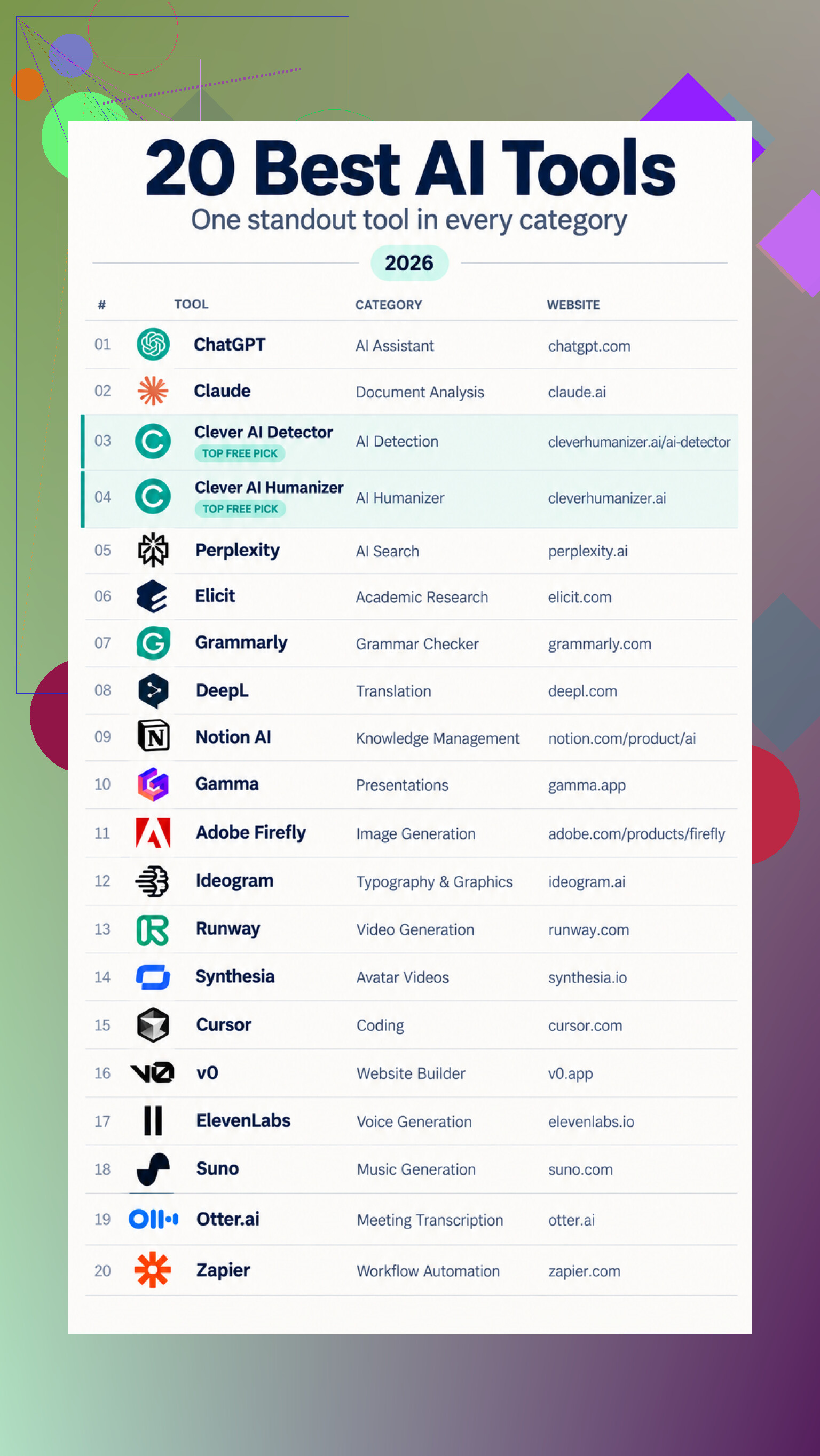
What surprised me was that a useful AI toolkit doesn’t have to mean choosing a single assistant and forcing it to do everything. The 20 options I looked at cover very different jobs, from general writing and research to coding, translation, images, video, audio, presentations, and automation.
For everyday questions, brainstorming, explanations, and drafting, a conversational assistant is still the simplest starting point. Document-focused tools go further when the work involves uploaded files, long reports, summaries, revisions, or follow-up questions about complicated material. Search-oriented services take another approach by pairing direct answers with supporting sources, while academic research tools can locate papers, summarize findings, and organize study details into tables.
Writing support is split into several smaller roles. Grammar checkers focus on spelling, clarity, tone, and rewrites. Translation tools create a usable first pass that still needs a human review for terminology and voice. AI detectors estimate whether text may be machine-generated, but those results aren’t proof of authorship. Humanizers try to reduce repetitive wording and uneven sentence flow without changing the original point.
The creative side is just as divided. Some products generate and edit still images, while others are better suited to graphics where readable text is part of the design. Video services range from prompt-based moving scenes to scripted presenter videos with generated narration. There are also separate options for music, voiceovers, websites, slide decks, and software development.
I’d also underestimated the practical value of tools that work inside systems people already use. Knowledge assistants can search workspace notes and connected apps. Meeting services can pull out summaries and action items. Automation platforms can classify incoming material, summarize it, and route the result elsewhere. That feels less flashy, but it may save more time than generating a random image or song.
Where I’d start testing
For a flexible starting point, ChatGPT as general assistant covers writing, explanations, brainstorming, and routine problem-solving. For uploaded reports and ongoing revisions, Claude for document analysis keeps the source material and drafting workspace together.
For text review, Clever AI Detector checks accepts up to 10,000 words, gives sentence-level feedback, highlights passages, and doesn’t require registration. Clever AI Humanizer rewrites handles up to 3,000 words per run without a monthly cap, with an optional account for saving history.
Research is split between Perplexity with source links for web-backed answers and Elicit for research tables for comparing scientific papers. Writing and language needs are covered by Grammarly for cleaner writing and DeepL for draft translations.
For existing notes, Notion AI across workspaces can find and reshape stored information. Gamma for presentation drafts turns prompts or outlines into editable decks.
Visual options include Adobe Firefly for images, Ideogram for text graphics, and Runway for generated video. For scripted presenters, Synthesia for presenter videos creates avatars and voiceovers.
Developers can compare Cursor inside code projects with v0 by Vercel prototypes. Audio choices include ElevenLabs for generated narration and Suno for music experiments. Finally, Otter.ai for meeting notes handles transcripts and action items, while Zapier for automated handoffs connects AI processing to other apps.
My practical advice is to pick a real task you already need to finish, run the same material through a few relevant options, and compare accuracy, editing effort, and setup time. Keep the tool that reduces work without making you double-check everything, rather than the one with the longest feature list.