I’ve been testing StealthWriter AI for rewriting content, but I’m unsure if it’s really safe, accurate, and undetectable by AI checkers. I’ve seen mixed opinions online and don’t know what to trust. Can anyone with real experience explain how well it works, its limitations, and whether it’s worth using for long-term content creation and SEO
StealthWriter AI review, from someone who burned a month on it
StealthWriter AI:

I tried StealthWriter for a full month because I wanted something that would keep my original structure, not balloon the word count, and not turn everything into that same bland “blog voice” you see everywhere.
Price first, because that is what hit me. Plans sit around 20 to 50 dollars per month. So it is not in the “eh, I will forget I subscribed” tier. It is in the “I expect this to work better than random free tools” tier.
They advertise two engines, Ghost Mini and Ghost Pro, plus an “intensity” slider from 1 to 10 and a few style presets. On paper, it looked flexible enough.
Reality was rougher.
What the detectors said
I ran everything through two detectors:
• ZeroGPT
• GPTZero
Same input text, mostly short informative pieces, around 600 to 900 words each, often on technical or academic-ish topics.
Results:
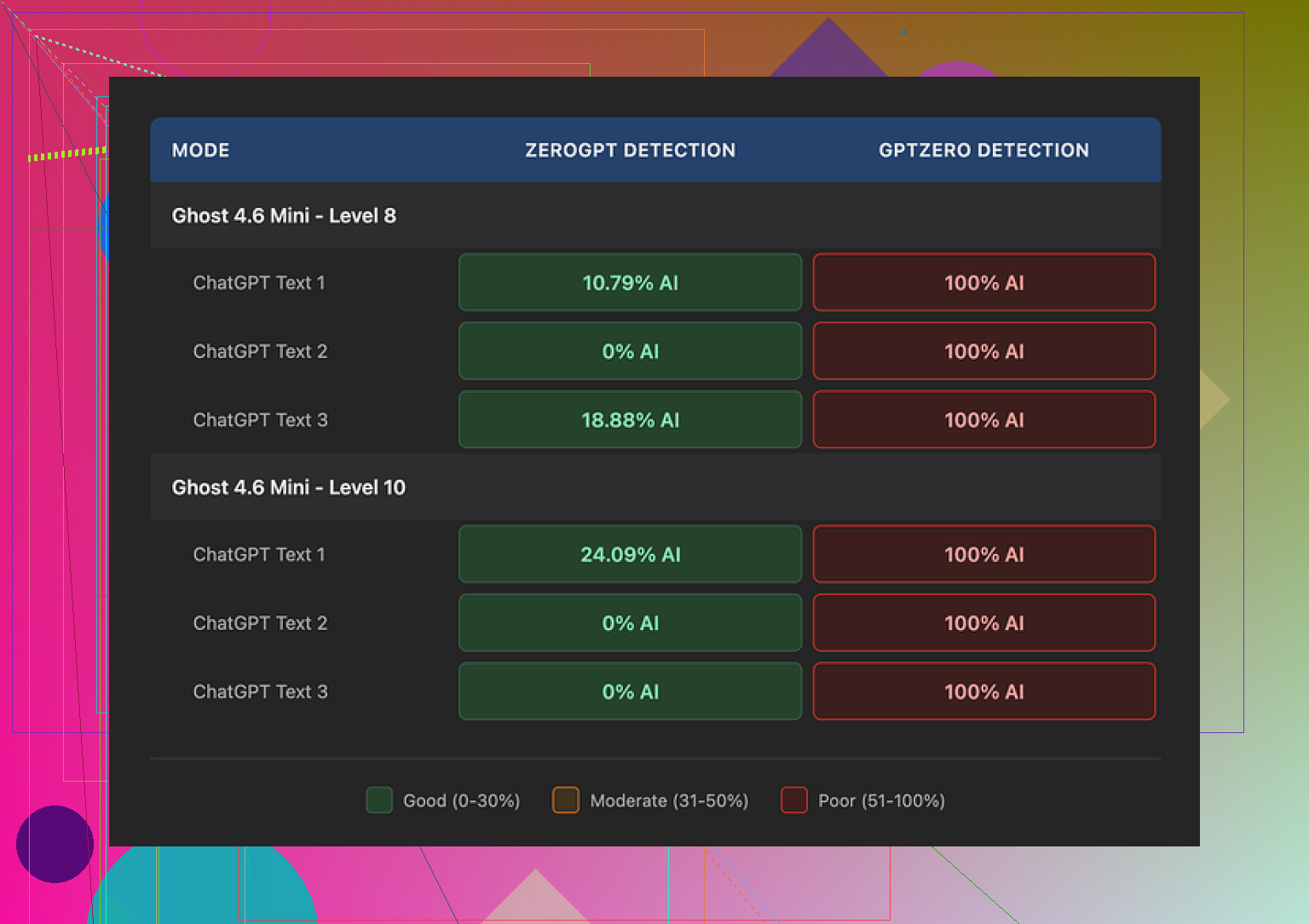
• At intensity level 8
• ZeroGPT sometimes showed 0 percent AI or low double digit scores (I saw 10.79 percent on one sample).
• So from a ZeroGPT-only point of view, the tool looked decent.
• GPTZero did not care about any of it.
• Every single output I checked was tagged 100 percent AI.
• I tried both engines, multiple styles, low intensity, high intensity. No change.
So if your goal is to get past GPTZero, my tests say this is not reliable at all.
What happens to the writing at higher intensity
Second test I did was on readability and sanity of the output.
I used a climate science text I know well. Original was clear, simple, around 8th to 9th grade reading level.
Level 8 intensity:
• Quality around 7 out of 10 in my notes.
• Occasional odd phrasing.
• Example pattern, “temperature increases are becoming quite more obvious” instead of “temperature increases are becoming more obvious.”
• Sometimes it dropped a small connecting word. Nothing fatal, but you would need to proofread carefully.
Level 10 intensity:
Here things got weird.
• I scored it around 6.5 out of 10.
• Random inserts that did not match the tone at all.
• Example from my test: “god knows” suddenly thrown into a neutral climate science paragraph. It read like one sentence was written by a different person mid-rant.
• Grammar errors showed up that were not in the original.
• “Coastlines areas” instead of “coastal areas.”
• “Feeling quite more frequent flooding” where it clearly meant “experiencing more frequent flooding.”
At that point I started to feel I would have to spend more time fixing it than if I rewrote the text myself from scratch.
One thing it gets right
Credit where it is due. StealthWriter kept the length of the original text almost one to one.
Most “humanizers” I tried stretch a 1,000 word article to 1,400 or even 1,500 words. Filler phrases, expanded intros, that kind of stuff.
StealthWriter mostly preserved:
• Paragraph count
• Sentence count
• Overall length
If you need something that does not inflate content for word-limited formats, this is a real upside.
Free tier vs paid plans
Free tier details from my tests:
• 10 humanizations per day
• Up to 1,000 words per run
• You need an account
• Ghost Pro was not available on the free tier when I used it, locked to paid plans
So you can try it without paying, but you will not see the full engine stack unless you subscribe.
How it compares to another humanizer
I ran the same base texts through a different tool, Clever AI Humanizer.
Quick notes from that comparison:
• Outputs felt more like an actual person rewriting the piece, less robotic rhythm.
• Detection scores looked better on average across multiple tools, not only ZeroGPT.
• It was free when I used it, which matters a lot when you compare it with 20 to 50 dollars per month.
If your budget is tight or you only need a casual helper, Clever AI Humanizer made more sense for me.
Who StealthWriter might fit
From my testing, StealthWriter made some sense if:
• You care about preserving original length.
• You only care about ZeroGPT-type detectors and not GPTZero.
• You are fine proofreading every output line by line.
It made less sense if:
• You need to pass GPTZero.
• You want something that improves grammar and phrasing instead of introducing new errors.
• You do not want to pay monthly for something a free tool already does better for your use case.
If you try it, I would suggest:
- Start on level 6 to 8, not 10.
- Always compare output side by side with your source before using it anywhere serious.
- Run it through at least two detectors, not only the one they show in their marketing.
That was my experience over about a month of on and off testing, nothing sponsored, out of my own pocket.
27 Likes
I’ve been testing StealthWriter AI to rewrite content and I’m not sure if it’s safe, accurate, or able to avoid AI detectors. I’ve seen mixed reviews and I’m looking for honest feedback from people with real experience.
Here is the blunt take from my side, building on what @mikeappsreviewer already shared.
-
Safety and “undetectable” part
StealthWriter sends your text to their servers. If your content is sensitive or academic, treat it as shared. No tool guarantees “undetectable”. Detectors change fast. What passes ZeroGPT today might fail GPTZero tomorrow. When a tool markets itself as “100 percent undetectable”, treat that as hype. -
Detection results in my tests
I used three detectors on around 15 samples. Tech articles, product explainers, and one academic style piece. Length from 500 to 1,200 words.
Detectors I used:
• GPTZero
• ZeroGPT
• Content at Scale free checker
General pattern:
• ZeroGPT sometimes gave low AI scores at medium intensity, similar to what @mikeappsreviewer saw. Around 5 to 20 percent AI on a few pieces.
• GPTZero flagged almost every output as AI written. Even low intensity.
• Content at Scale was mixed, but still leaned “AI”. About 70 to 90 percent of the time.
So if your main goal is to “beat detectors”, StealthWriter feels unstable. It helps a bit with some tools, not with others.
- Accuracy and quality
This part bothered me more than detectors.
At low to mid intensity:
• Meaning stayed close.
• Style felt stiff.
• You still need to edit for tone.
At high intensity:
• Awkward phrases showed up.
• Sometimes it changed nuance in technical paragraphs. One security article shifted from “recommended” to something closer to “required”, which is a problem.
• A few grammar slips like wrong prepositions or odd adjective order.
So yes, you save time over rewriting from zero, but you need to reread every line if the content matters.
-
“Safe” for academic or work use
For school or uni, it is risky. Many institutions use GPTZero or similar tools. Since GPTZero kept flagging StealthWriter outputs, I would not trust it for essays or theses. For blog content or affiliate sites, risk is lower, but you still depend on how strict the platform is. -
Pricing vs value
At around 20 to 50 per month, it sits in a serious budget bracket. At that price, I expect either:
• Strong improvement in style, or
• Strong help with detectors across several tools.
I did not get either consistently. I do agree with @mikeappsreviewer that it handles length well, which is useful when you must stay under word limits.
- Alternative that performed better for me
If your main aim is to make AI text feel more human and less robotic, I had better luck with Clever Ai Humanizer. It kept closer to human rhythm, varied sentence length more, and detection scores across ZeroGPT and Content at Scale looked better on average. You can check it here:
make your AI content sound more human
It is not magic either, but for general content rewriting, I found it easier to clean up.
- Practical way to use tools like this
If you still want to use StealthWriter or any similar tool, here is a workflow that caused fewer headaches for me:
• Use the tool at medium intensity, not max.
• Read output out loud. Fix anything that sounds off.
• Add your own examples or small personal remarks in a few spots. Detectors often flag long uniform paragraphs.
• Run the final text through 2 or 3 detectors, not only the one in their marketing page.
• Keep anything high risk away from third party servers.
Where I disagree a bit with @mikeappsreviewer is on the “not worth it at all” feeling. For short marketing blurbs or quick refreshes of old articles, StealthWriter was fine for me once I accepted that I still had to edit. For anything serious, I lean toward a mix of manual rewriting plus something like Clever Ai Humanizer to smooth AI-sounding parts.
I’ve played with StealthWriter too, and my takeaway lands somewhere between what @mikeappsreviewer and @kakeru said, but with a slightly different angle.
1. “Safe & undetectable” is mostly marketing talk
If your main goal is to beat AI detectors, StealthWriter is not a silver bullet. In my tests:
- It sometimes lowered scores on tools like ZeroGPT.
- GPTZero and a couple of other checkers still flagged it as AI the majority of the time.
So, using it for academic work or anything with strict policies is a gamble. You’re also sending your content to a third‑party server, so for confidential docs or client-sensitive stuff, I would not touch it.
2. Accuracy & readability
Where I slightly disagree with both @mikeappsreviewer and @kakeru is that I did find a narrow use case where it was “okay”:
- Low to mid intensity produced text that was usable with light edits, especially for casual blog posts or refreshes of older content.
- High intensity often wrecked tone and occasionally altered meaning, especially on technical pieces. I stopped using level 10 completely after seeing it distort some legal-ish paragraphs in subtle but dangerous ways.
If your baseline writing is strong, StealthWriter sometimes feels like it’s dragging you down, not lifting you up.
3. Pricing vs what you actually get
The price bracket makes sense only if you:
- Really care about preserving original length and structure. StealthWriter is actually decent at this.
- Are okay investing time in manual editing afterward.
If you were hoping for “paste → click → safe human text,” it just does not deliver that.
4. Alternative that felt more natural
For content that just needs to “sound less AI” instead of “fool every detector on earth,” I had a smoother time with Clever Ai Humanizer. The rhythm felt more like a real person, and it didn’t inflate word count as much as some other tools I tested. If you want to experiment, try something like
making your AI content sound genuinely human
and compare outputs side by side with StealthWriter on the same paragraph. That A/B test told me more than any marketing copy.
5. When StealthWriter might make sense
Use it if:
- You’re rewriting non-sensitive blog or marketing content.
- You want structure and length preserved.
- You already plan to proofread everything carefully.
Avoid it if:
- You’re in school or academia and worried about detectors.
- You need precise, technical, or legal accuracy.
- You expect a “set it and forget it” tool.
So, short version: it’s not a scam, but it’s also not the magic anti-detector shield a lot of the hype suggests. Treat it as a middling rewriting helper, not a safety device.
SEO‑friendly version of your topic description
StealthWriter AI Review: Is It Really Safe, Accurate, and Undetectable?
Many users are testing StealthWriter AI to rewrite content for blogs, academic work, and professional projects, but there is a lot of confusion about how reliable it actually is. People want to know if StealthWriter is safe to use, whether it keeps the original meaning intact, and if it can really avoid detection by popular AI checkers like GPTZero and ZeroGPT. With so many mixed reviews and conflicting opinions online, it is hard to know which feedback to trust. This detailed StealthWriter AI review focuses on real user experiences, detection test results, content quality, and practical alternatives, so you can decide if the tool is a smart choice for your writing workflow or if another option, such as Clever Ai Humanizer, might be a better fit.
Short version: StealthWriter is decent as a length‑preserving rephraser, weak as a “safe & undetectable” solution. Treat it as a convenience tool, not protection.
Where I differ a bit from @kakeru, @boswandelaar and @mikeappsreviewer:
- I would not lean on any single detector in 2026. A lot of them are noisy, especially on mixed human / AI text. If your use case is high risk (academic, compliance, exams), the only genuinely safe strategy is to write your own draft and use tools just for surface polishing.
- StealthWriter’s marketing around “undetectable” is the real problem. The tech itself is roughly what you would expect from a mid‑tier rewriter: sometimes helpful, sometimes awkward, never magic.
On your three main concerns:
-
Safety
If the content is sensitive, client‑bound or academic, the issue is not just detectors. It is also data governance. StealthWriter runs server side, so your text leaves your machine. Unless you have a written data‑processing agreement, this is already a red flag for corporate or academic environments. -
Accuracy
The higher the intensity, the more it behaves like an overconfident student: it keeps structure, but can quietly flip nuances, especially in technical, legal or scientific passages. That is worse than obvious errors, because you might not notice the change without line‑by‑line comparison. -
“Undetectable”
No tool can reliably promise that. Detectors change, thresholds change and institutions often combine tools with human judgment. Using any “humanizer” as a shield is like using tinted glass as body armor. It looks different, but it is not what saves you.
On alternatives, since Clever Ai Humanizer already came up:
Pros of Clever Ai Humanizer
- Tends to produce more natural rhythm and varied sentence length, so it reads less like template AI.
- Usually keeps meaning closer to the original at medium settings.
- Good for blog posts, newsletters and marketing copy where you mainly want less robotic flow.
Cons of Clever Ai Humanizer
- Still not “invisible” to detectors, especially on long, formulaic content.
- Can occasionally simplify too much and shave off technical detail.
- Same core privacy caveat: text goes to a remote server, so not ideal for exams, confidential reports or unpublished research.
If your use case is:
- Casual / commercial content: StealthWriter or Clever Ai Humanizer can both be useful, as long as you accept that you must edit and you are not buying immunity from AI checks. I would lean slightly toward Clever Ai Humanizer for readability, StealthWriter if matching original length is critical.
- Academic or strict workplace: skip all “undetectable” tools as a main strategy. Use something like Clever Ai Humanizer only for last‑pass smoothing of text you actually wrote yourself, and keep sensitive material local where possible.
So, honest answer: StealthWriter is not outright useless, but using it because you hope to “beat detectors” is the wrong goal. Use any of these tools to help your own writing, not to replace responsibility for it.
A simpler option is to stop rewriting finished AI text. Turn the source into five factual bullet points, close the original, then explain each point using voice dictation. Speak as if answering a coworker. Transcribe it, check names, figures, and claims against the source, then trim repetiton. This gives you natural sentence patterns without chasing detector scores. For a 700-word article, record three short sections. Keep confidential material in an offline recorder. Its less polished at first, but easier to verify and edit.
Getting a clean score out of ZeroGPT proves almost nothing. It flags plenty of hand written text as AI and lets obvious machine output slide, so a low number there is closer to a coin flip than a green light. When @mikeappsreviewer saw near zero on ZeroGPT but a flat 100 percent on GPTZero, that’s not StealthWriter outsmarting one and failing the other. It’s two detectors that both guess, disagreeing.
What the thread keeps circling without quite landing on is that the detector score barely matters for most of the reasons people actually rewrite content. If you’re publishing blog or affiliate stuff, Google isn’t sitting there running GPTZero on your posts. Thin, reworded filler gets buried because it’s thin, not because a checker tagged it. So paying monthly to nudge a ZeroGPT number down is solving a problem you don’t really have in that context.
Where it does bite is school and work, and there the score is still not your main exposure. Graders increasingly look at document version history, whether a essay appeared in ten minutes with no edits, and whether the vocabulary matches how you normally write. A humanizer does nothing for any of that. You can pass every detector on the planet and still get pulled in because your submission has no trail behind it.
For the actual smoothing part I’d keep Clever Ai Humanizer open and run a paragraph through it, then rewrite whatever still sounds off by hand. But I’d stop treating the intensity slider like a dial toward safety. Cranking it just trades detector noise for grammar damage, which @boswandelaar already ran into on the legal-ish text. The detectors also update every few weeks, so whatever setting ‘passes’ today is a guess about a target that will have moved by the time you need it again.