I accidentally deleted photos from my SD card after a camera transfer went wrong, and now important pictures are missing. I’m looking for the best photo recovery software for an SD card that’s safe, easy to use, and actually works. If anyone has recommendations for recovering deleted photos from an SD card, I’d really appreciate the help.
I’ve had this happen after wedding shoots, travel dumps, even one dumb afternoon where I wiped a card in-camera before coffee. You plug the SD card in and Windows throws the “format this drive” message, or you notice the camera ate the folder. Sick feeling. I know it.
Backups help until they don’t. I’ve watched sync apps copy the deletion across devices like it was doing me a favor. I’ve also lost files before the backup job even ran. At that point, recovery software is the thing left on the table.
What I’d try first
If you want the option I’ve had the least trouble with, start with Disk Drill. I kept circling back to it because it’s easy to run when you’re stressed and trying not to make the situation worse. The layout is clean. You pick the card, scan, wait, preview, recover. No weird ritual.
The bigger reason I kept it installed was results. In tests I saw, recovery rates were around 91%, which lined up pretty closely with what I got on damaged SD cards and a couple of messed-up USB drives. Not perfect, no tool is, but better than most of the stuff I tried.
Where it pulled ahead for me was video. Action cams, drones, mirrorless bodies, they often scatter video data in chunks across the card. A lot of apps will detect the clip, let you recover it, then you open it and it skips, freezes, or won’t play at all. Disk Drill does a better job rebuilding those split-up files into something usable. If you shoot RAW, it also handles the formats people care about, CR3, NEF, ARW, and the usual pile of others. There’s a free recovery allowance too, so you get a quick read on whether your case is salvageable before paying.
If your budget is zero
I used PhotoRec when I didn’t want to spend anything and was willing to trade comfort for brute force. It’s free, open source, and ugly in the old-school terminal way. You don’t click around much. You work through text menus and try not to pick the wrong disk while half-panicked.
It scans raw sectors and looks for file signatures instead of relying on the file system. This matters when the card structure is trashed. I’ve had it pull JPEGs and RAW files off media other tools barely recognized. The downside is nasty, though. You lose the original names. You lose folder layout. You end up with a dump of files named like f12345.jpg and you sort it out by hand. If you’ve got 4,000 images from a trip, enjoy your evening.
There’s also QPhotoRec, which puts a light interface on top of it. I tried it. It helps a bit. It still feels rough.
Other tools I’ve used when the situation was specific
-
DiskGenius worked well for RAW image recovery and deeper disk work when I needed more control. It’s fast. It also looks old, and I mean old. I wouldn’t hand it to someone who wants a simple two-click process.
-
DiskDigger made sense on Android when I was trying to recover files straight from the phone. One catch matters a lot here. If the phone isn’t rooted, you usually get thumbnails, cached images, or smaller leftovers instead of the full original files.
-
Recuva is still decent for the easy cases on Windows. If you deleted a folder from a healthy drive ten minutes ago and stopped touching the drive, I’d try it. For corrupted cards or deep scans, I moved on pretty fast.
The part where people make it worse
Stop using the card right now. Don’t shoot one more photo. Don’t copy random files onto it. Don’t format it to “see if it helps.” Every write lowers your odds.
And when you recover files, send them somewhere else. Your desktop, another SSD, an external drive, whatever. Not back to the same SD card. I did see people do this. It went as badly as you’d think.
One more thing, use a dedicated card reader if this is an SD card. Don’t leave it in the camera and connect over USB. Cameras often block the lower-level access recovery apps need for a proper scan. A cheap reader usually works better than the camera cable route.
My short version
If I wanted the best shot at getting photos or video back without turning it into a side project, I’d start with Disk Drill. If money is the issue and you don’t mind extra cleanup, PhotoRec is still worth your time. If the deletion was recent and simple on Windows, Recuva is fine.
What matters first is speed and restraint. Stop writing to the card, use a reader, recover to a different drive. I learned those rules the hard way, twice i think. Maybe three times.
18 Likes
Stop using the SD card. That matters more than the app.
I agree with @mikeappsreviewer on one point, Disk Drill is the easiest place to start if you want SD card photo recovery software that does not waste your time. It scans fast, previews files well, and it tends to recover RAW and JPG sets in a cleaner way than a lot of older tools. For most people, that is the best first pick.
Where I disagree a bit is Recuva. I would skip it for camera SD cards unless the deletion was fresh and simple. It misses too much once the card gets messy or the file table is damaged.
My short list:
- Disk Drill, best mix of ease, preview, and recovery quality.
- R-Studio, better if you want deeper control and file system work, but the interface is less friendly.
- RescuePRO Deluxe, worth trying if your SD card came with a license code. SanDisk bundles it often. Results are decent for photo loss cases.
- PhotoRec, strong free option, but sorting the recovered files is a pain in the ass.
A few practical tips.
Use a card reader, not the camera cable.
Recover to your computer or another drive, not back to the SD card.
If the card shows errors, make an image of it first with something like USB Image Tool or R-Studio.
Also, this roundup on other image recovery tools is worth a look:
best image recovery software for SD cards and deleted photos
If you want the safest easy route, start with Disk Drill first. If it finds your missing previews, you’re in decent shape. If it finds garbled files or nothing useful, move to R-Studio or PhotoRec. Dont keep rescanning the card in random apps for hours while still plugging it into the camera.
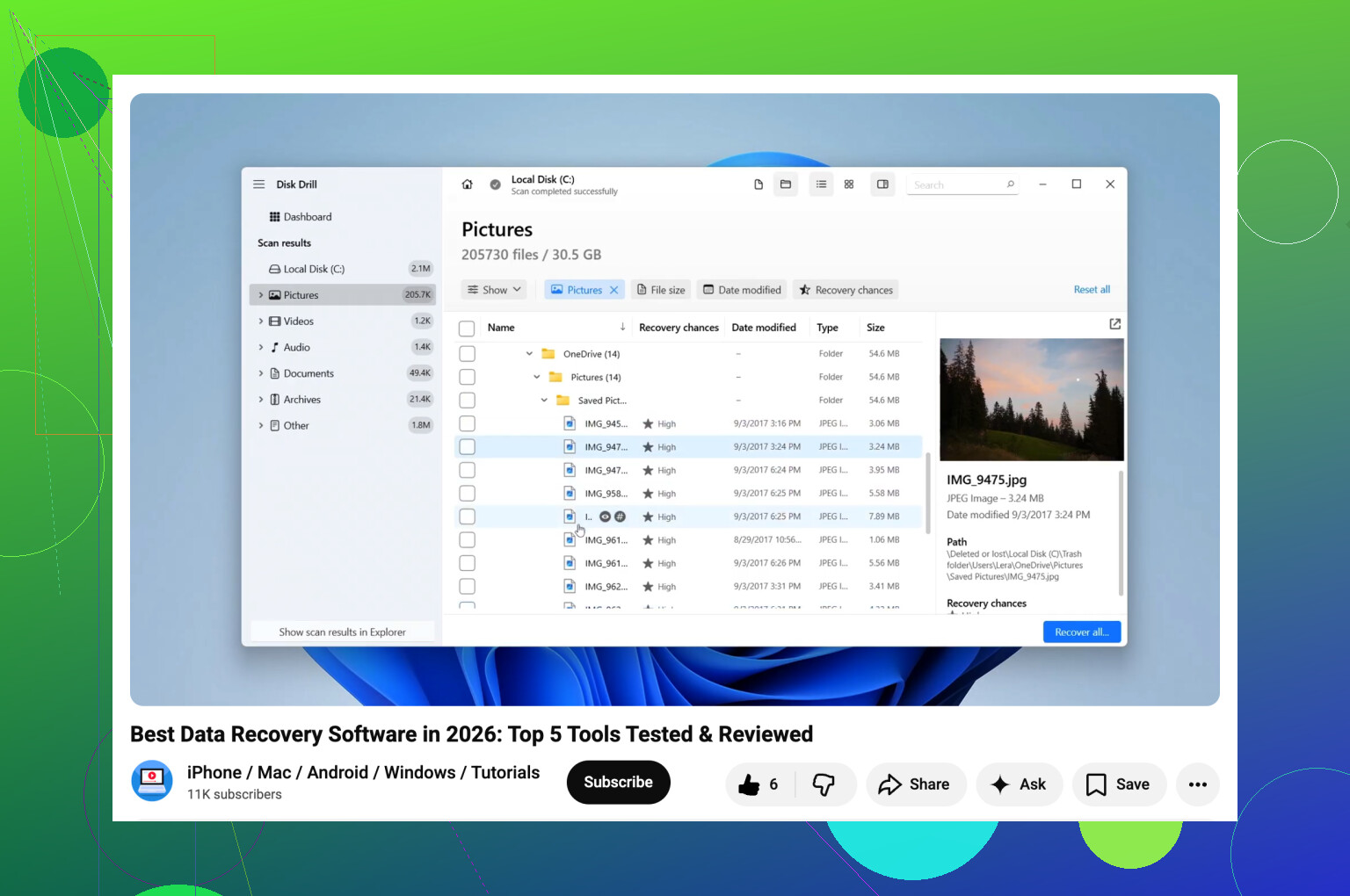
I’d actually split this into two situations, because people lump them together and the fix is not always the same.
If the SD card still shows up normally and the photos were just deleted after the transfer mess, Disk Drill is probly the best first try. Not because it’s magic, just because it’s one of the easier tools to use without clicking yourself into a bigger disaster. Preview is solid, and that matters more than people admit. If you can preview the missing shots before recovery, that’s a very good sign.
Where I kinda disagree with @mikeappsreviewer and @espritlibre is the whole “try a bunch of apps one after another” habit. On flaky cards, that can turn into hours of rescans, card reconnects, and extra stress for no reason. I’d pick one easy tool first, then one deeper tool only if needed.
My order would be:
- Disk Drill for deleted photos on SD card, especially if you want safe and easy.
- R-Photo if you want a free photo-focused option on Windows. It’s less talked about, but surprisingly decent for image recovery.
- PhotoRec only if the card structure is busted and you’re okay sorting a giant pile of ugly filenames later.
Also, if the card is acting weird, disconnecting, asking to format, or not mounting right, don’t keep poking it. Make an image of the card first if possible, then scan the image instead of the card itself. That’s the part people skip and then wonder why recoverd files come back corrupted.
For anyone also dealing with a card that won’t even show up properly, this thread is relevant: how to recover photos from a microSD card not detected on your laptop
Short version: for the best SD card photo recovery software, I’d start with Disk Drill. If it previews your files, recover them to another drive immediately. If not, move to a more forensic-style tool instead of just randomly trying five apps back to back.

One angle I think is missing from @espritlibre, @ombrasilente, and @mikeappsreviewer is this: if the transfer “deleted” photos, some may still exist in the camera’s hidden metadata folders or as sidecar-linked entries, so a tool with good preview and RAW awareness matters more than raw scan speed.
That’s why I’d still lean Disk Drill first for SD card photo recovery, but not for the exact same reason they gave.
Pros of Disk Drill
- Very easy to verify files before recovery
- Good support for common camera photo formats
- Cleaner interface than most recovery tools
- Decent at handling both accidental deletion and light corruption
Cons of Disk Drill
- Deep scans can still return lots of junk
- Not the cheapest option if free recovery is not enough
- If the card is physically failing, it won’t magically fix that
Small disagreement: I would not jump to PhotoRec too fast unless filenames and folder structure mean nothing to you. For event shoots or family albums, that mess can be brutal.
My take:
- Disk Drill for easiest safe first pass
- R-Studio if you need forensic-level control
- RescuePRO only if you already have it bundled with the card
If previews look good in Disk Drill, recover immediately to another drive and stop experimenting. If previews are broken, the issue may be card damage, not just deletion.