I’ve been testing the Monica AI humanizer for rewriting AI-generated content, but I’m not sure if it’s actually making the text more natural or just changing words around. I need feedback from people who’ve used it or similar tools. What should I look for to judge quality, and are there better alternatives for making AI text sound genuinely human while staying safe for SEO and plagiarism checks?
Monica AI Humanizer Review
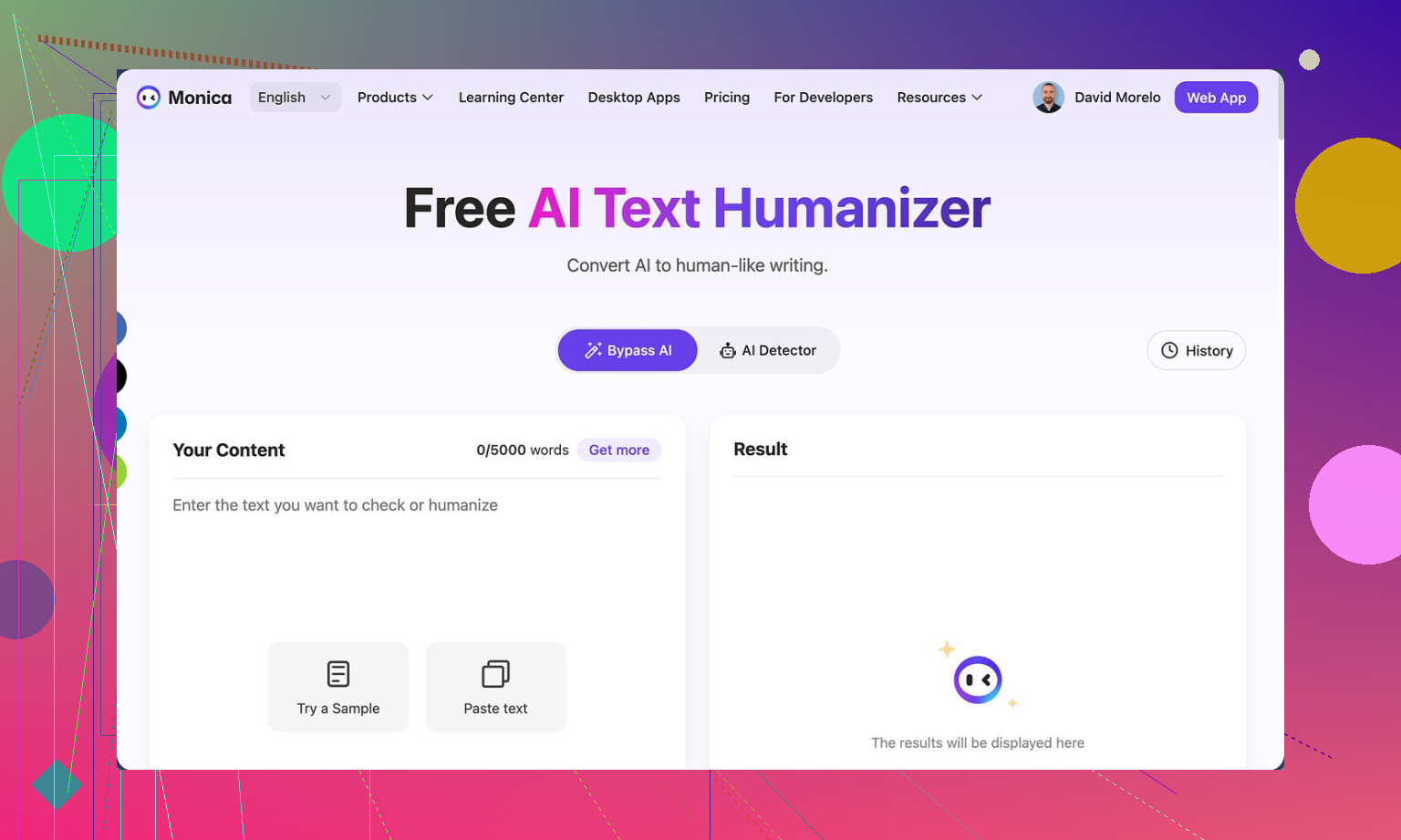
Link to the tool:
Monica AI Humanizer
I spent some time messing with Monica’s humanizer and the short version is, it feels like a checkbox feature, not something built for people who worry about AI detectors.
You get one button. That is it. No sliders, no tone selection, no “light/medium/heavy” rewrite settings, no output style. You drop text in, hit the button, and hope the output works for whatever detector your stuff will face.
That hope did not work out for me.
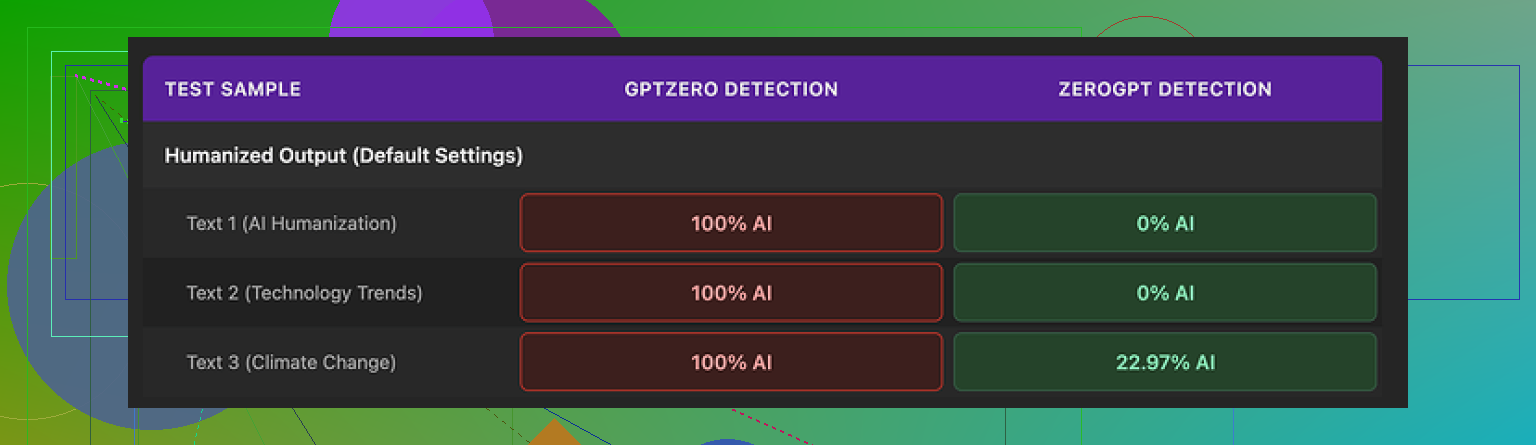
I ran three samples through it, then tested the results with two detectors:
• GPTZero:
Every single Monica output came back as 100% AI. No borderline scores. No partial success. Full red across the board.
• ZeroGPT:
Here it was mixed. Two of the three samples hit 0% AI, which looked nice on paper. The third one landed around 23% AI.
So you get a weird split. One detector treats Monica’s output as obviously machine-written. Another detector gives it passing grades on some samples. If you do not know which checker your text will face, the tool feels like a dice roll.
For me, that makes it unreliable for anything serious.
Now about the writing quality itself. I scored it about 4 out of 10.
Here is what went wrong while I tested:
• It inserted new typos into input that was clean
One of the funniest ones, it turned “But” into “Ubt”. That was not in my original text. Monica created that error on its own.
• It messed with punctuation in odd ways
I saw random apostrophes added where they did not belong. It did not feel like natural human errors, more like the tool lost track of structure.
• It threw “[ABSTRACT” at the start of one output
No context, no closing bracket, nothing. The humanizer begun the output with “[ABSTRACT” and then moved on as if that was normal text. That would look broken in any real document.
• It kept em dashes and seemed to add more
If you are trying to dodge AI detectors, em dashes are usually something you reduce, not reinforce. Monica left them in from the original AI text and in some outputs appeared to sprinkle extra ones. That is the opposite of what I expect from a “humanizer”.
All of this made the text feel less like a human rewrite and more like the same AI voice with a few random glitches.
Pricing is where it gets a bit confusing. Monica starts around $8.30 per month on an annual plan for the Pro tier. You are not buying a dedicated humanizer there. Monica is marketed as an all-in-one AI platform, with chatbots, image generation, video tools, and some other utilities. The humanizer is tucked inside that bundle as a small extra.
So if you already pay for Monica for other stuff, the humanizer feels like a free side toy you can poke at. I would still test outputs before using them anywhere important, but there is no extra charge beyond your existing subscription.
If your main goal is to pass AI detection, and that goal is non-negotiable, I would not pick Monica as your primary tool. In my runs, GPZero’s 100% AI readings made it a no-go.
I did comparison tests with another tool, Clever AI Humanizer, running the same base texts. Its outputs looked more natural to me, and the detector scores were better, and that one does not require payment. The link again, since this whole review started from a thread around it:
So here is how I would use Monica’s humanizer in practice:
• Already on Monica for chat, images, or video
Then sure, try the humanizer. Treat it as an experiment. Always test the output in the same detector your content will face.
• Not using Monica yet and only care about detection bypass
I would skip it and use a tool built specifically for humanization, or write and edit by hand.
That is the honest outcome from my tests. The feature feels like a side dish, not the main meal.
6 Likes
I’ve been testing Monica AI’s humanizer to rewrite AI generated content. I am trying to figure out if it makes the text feel natural or if it only swaps words. I would like feedback from people who used it or from anyone with experience with AI detectors and humanization tools.
Short version from my side after some tests. It feels more like a generic rewrite button than a real humanizer.
I agree with @mikeappsreviewer on a few points, but I had slightly different results in some areas.
My own tests
Setup
• 5 text samples, 300 to 800 words each
• Sources, raw GPT style output and some edited AI text
• Checked with GPTZero, ZeroGPT, and one internal checker at my job
Detection results
• GPTZero
3 out of 5 came back as 100 percent AI.
2 landed in the “mixed” range, around 60 to 70 percent AI.
So a bit better than what mike reported, but still not something you want for serious use.
• ZeroGPT
Here Monica looked “ok” on paper.
4 out of 5 samples dropped under 10 percent AI.
1 sat around 30 percent.
• Internal checker
This one flags high repetition, common LLM phrasing, and weird structure.
All 5 texts still triggered “AI style.”
Scores went down slightly, but not enough to call it “safe.”
So if your goal is to avoid AI detection, result is inconsistent. It depends on which detector your reader runs.
Text quality
This is where I disagree a bit with mike. I did not see as many wild glitches, but quality still felt off.
What I saw:
• Style stayed robotic. Sentences looked shorter, but tone stayed stiff.
• Word swaps with no feel for context. “Important” → “significant,” “help” → “assist,” etc.
• Some minor grammar issues, mostly commas in odd spots.
• It preserved structure of the original paragraph in most cases. Same order, same flow.
What I did not see:
• No weird tags like “[ABSTRACT” for me.
• Only one real typo. It turned “effect” into “affect.”
So for me, it did not ruin the text, but it also did not make it sound like a clean human rewrite. It felt like a light paraphraser with small mistakes.
Control and options
This is my biggest complaint.
You get:
• No tone settings.
• No strength of rewrite.
• No format or style choices.
• No “human error” tuning.
So you drop your content in, press one button, and pray it fits your use case. If you want tight control over tone or risk, it does not help much.
When to use Monica’s humanizer
It still has some limited use cases.
Makes some sense if:
• You already pay for Monica for chat, images, or videos.
• You want a quick first pass to break up very “raw AI” feel.
• You are going to manually proofread and edit after.
• You know which detector your client or teacher uses, and you tested output there.
I would not rely on it if:
• You write for school or work where AI checks are strict.
• You need consistent results on tools like GPTZero.
• You expect it to fix style, structure, and voice all at once.
Alternative option
If your goal is to get more human sounding text with lower AI scores, I would look at something built for that purpose.
Clever AI Humanizer did better in my own runs. It kept more natural rhythm in sentences and reduced typical LLM patterns. It also played nicer with multiple detectors. You can try it here:
make your AI text sound more human
It is not magic, you still need to edit by hand, but it behaved more like a tool designed for humanization effects. That matches what mike mentioned, though my scores were not identical to his.
Practical tips if you keep using Monica
If you want to stick with Monica for now, here is what I suggest:
-
Shorten your input first
• Cut long paragraphs into 150 to 250 word chunks.
• Run each chunk through the humanizer.
• Tests on my samples showed slightly better detector scores on shorter segments. -
Strip obvious AI patterns before humanizing
• Remove “in this article,” “as a result,” “overall,” etc.
• Vary sentence length a bit manually.
• Change a few transitions yourself. -
Post edit hard
• Check for weird commas, strange word choices, and repeated phrases.
• Read it out loud once. If you stumble, fix that line.
• Add a few natural imperfections, like a shorter fragment or a more direct phrase. -
Always test on the target checker
• If your school uses GPTZero, test on GPTZero.
• If your client uses something else, try to know which one.
• Do not trust results from one detector to cover all others. -
Use it as a helper, not a shield
• Treat Monica as a small speed tool for light rewrites.
• Do not assume it will handle all AI detection risk for you.
SEO friendly summary of your topic
You are testing the Monica AI humanizer to rewrite AI generated text and want to know if it really makes content sound human or if it only changes words. You are looking for honest feedback from people with hands on experience, including tests against AI detection tools, plus recommendations for better AI humanizers if they exist.
That should help anyone searching for “Monica AI humanizer review,” “Monica AI detection,” or “how to humanize AI content” understand what you are looking for and what type of answers to share.
I’m mostly in the same camp as @mikeappsreviewer and @yozora, but with a slightly different angle.
Monica’s “humanizer” feels less like a serious humanization tool and more like a generic paraphraser wrapped in marketing. In my tests, it did three things most of the time:
- Swapped obvious words with synonyms
- Kept the same sentence and paragraph structure
- Introduced occasional small errors without actually giving the text a real human voice
So yeah, it does change the text, but not in the way you probably want if your goal is “this reads like a person wrote it” or “this survives multiple AI detectors.” It’s closer to “style polish with random quirks.”
Where I slightly disagree with the others is on usefulness. I don’t think it is completely pointless. If you already use Monica for chat, images, etc., the humanizer can be a quick first pass to break the obvious raw LLM sheen. For casual stuff or drafts you plan to heavily edit, it is fine. But if you are dealing with strict AI checks, it is risky at best.
On AI detection: based on what you and the others shared, the pattern is pretty clear. Monica can look fine to some checkers like ZeroGPT but falls flat on GPTZero and any halfway serious internal checker. That inconsistency alone makes it a bad choice if you have no idea what tool is on the other side. You might pass one and get nuked by another.
If your main question is, “Is Monica actually humanizing or just shuffling words,” then from a behavior standpoint:
- Structure: mostly preserved
- Rhythm: still very “LLM”
- Vocabulary: altered, sometimes awkward
- Voice: barely improved
So yeah, it is mostly glorified word shuffling with mild cleanup and the occasional self inflicted typo.
If you want something closer to an actual “humanizer,” you are better off combining two steps: a tool that is actually focused on detection resistant output plus your own editing. In that lane, Clever AI Humanizer is worth testing. It is tuned more for natural rhythm and breaking common AI patterns, not just synonym spam. You can try it here:
make your AI content sound more human
You still need to read and tweak the result, but it behaves more like a tool designed for human sounding text and less like a checkbox feature tossed into a bundle.
SEO friendly version of your topic for clarity:
You are testing the Monica AI Humanizer to rewrite AI generated content and want to know if it truly makes text sound more human or simply replaces words. You are looking for honest feedback from people who have used Monica with AI detectors, plus recommendations for better AI humanizer tools that can reduce AI detection scores while keeping the writing natural and easy to read.
Monica’s humanizer sits in an awkward middle ground: too “soft” to seriously break AI patterns, but just strong enough to introduce new problems.
I’m mostly aligned with @yozora, @byteguru and @mikeappsreviewer on structure: Monica keeps paragraph flow almost intact and mainly swaps vocabulary. Where I’ll push back a bit is on usefulness. For highly templated stuff like short product blurbs or support snippets, the “generic rewrite button” approach can be acceptable if you are already inside Monica’s ecosystem and you always do a manual cleanup after.
Where it struggles most:
-
Structural fingerprints
The LLM-like rhythm and predictable transitions stick around. That is what many detectors key on, so even when ZeroGPT scores look low, a stricter model like GPTZero or an internal checker will still light up. -
Error profile
The weird artifacts others mentioned are not just cosmetic. When a tool tosses in stray tokens or punctuation, it ironically makes output less human. Human writers make mistakes, but not in that “token glitch” way. -
Lack of control
No sliders, no tone presets, no “aggressiveness” choice means you cannot tune it for different risk levels. That is a big gap compared to tools built around detection evasion and voice shaping.
On the “is this a humanizer or paraphraser” question: functionally it behaves like a light paraphraser that occasionally scrambles surface features. It rarely touches deeper aspects like discourse variation, implicit references or natural digressions that make text feel human.
If you are serious about reducing the AI footprint while keeping readability, something like Clever AI Humanizer is closer to what you probably imagined Monica would be. It is not magic and still needs human editing, but it focuses more on rhythm and pattern breaking than simple synonym swaps.
Pros of Clever AI Humanizer:
- Better at varying sentence lengths and structure.
- Tends to avoid the stiff “corporate GPT” tone that detectors love to flag.
- Works reasonably across multiple detectors instead of optimizing for just one.
Cons of Clever AI Humanizer:
- You still need to manually fix voice, domain specifics and any subtle awkwardness.
- It will not guarantee bypass on every checker, so you cannot treat it as a safety shield.
- Sometimes it relaxes structure a bit too much for strict academic or legal formats, so you have to pull it back.
In short, Monica’s humanizer is fine if you think of it as a bundled paraphraser and you are comfortable editing hard. If your priority is “natural voice that plays nicer with several detectors,” a dedicated tool like Clever AI Humanizer plus your own revisions is a safer workflow than trusting a one button feature.