I’ve been using Humanize AI Pro to make my AI-written content sound more natural and less robotic, but the cost is starting to add up and I need to cut expenses. I’m looking for free tools or workflows that can achieve a similar “humanized” effect without getting flagged by AI detectors. What free options or strategies are you using that actually work for blogs, emails, or social posts?
- Clever AI Humanizer, my take
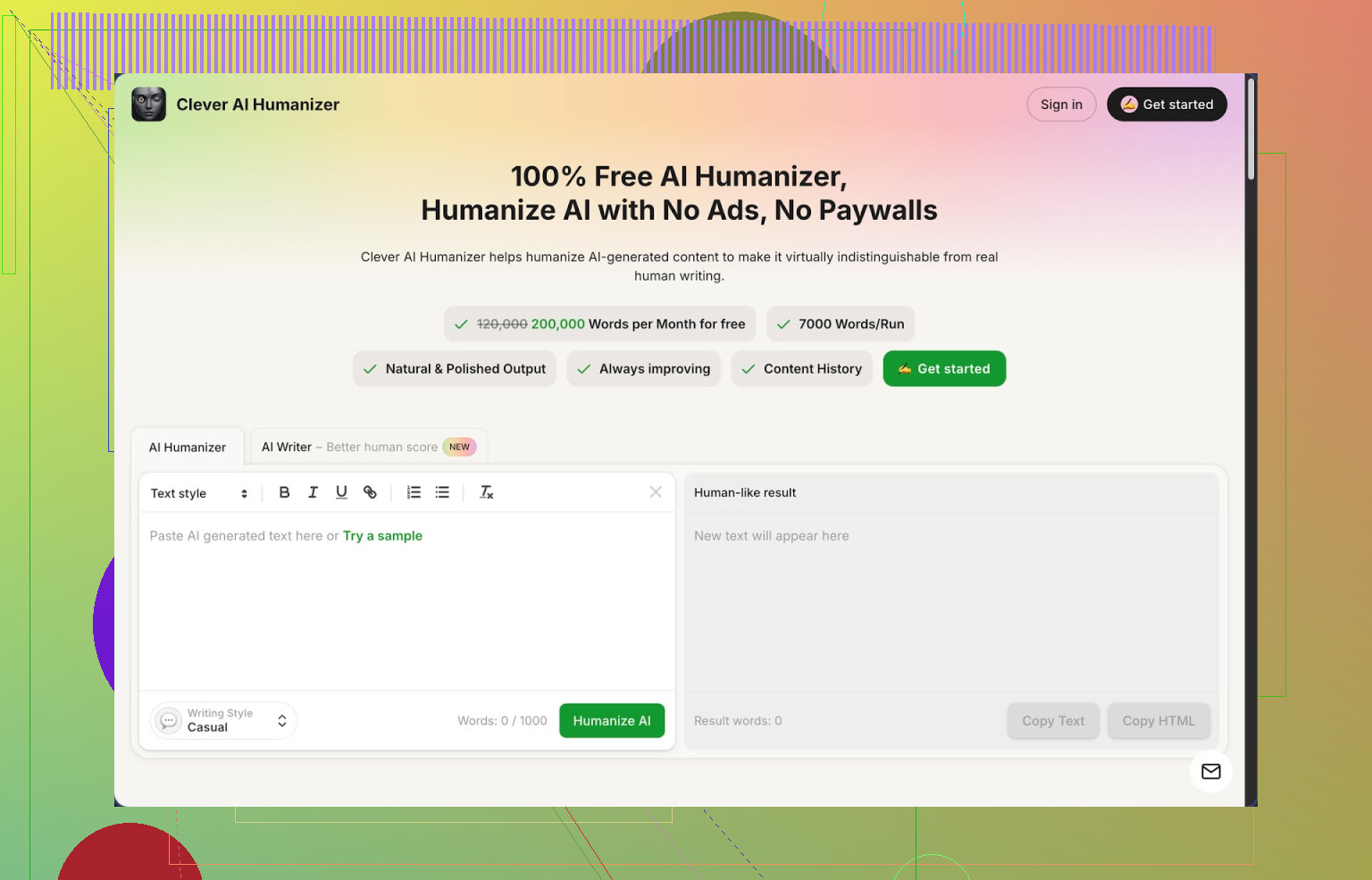
I stumbled into Clever AI Humanizer here: https://cleverhumanizer.ai and ended up using it way more than I expected.
Here is what pulled me in first. It is free, like actually free, with a monthly cap of around 200k words, and about 7k words per run. No credits, no “trial”, no nagging popups. For long essays or batch editing, that word limit matters more than fancy marketing.
They offer three styles:
- Casual
- Simple Academic
- Simple Formal
There is also a built-in AI Writer tied into the same page, so you write and “humanize” without jumping between tabs.
I tried to see if it survives detectors, so I pushed a few long chunks of text through it in Casual style and tested them on ZeroGPT. All three came out as 0 percent AI on that checker. That does not mean it will pass everything in every context, but it surprised me enough that I saved the site to my bookmarks.
If you use AI a lot, you know the problem. The writing feels stiff, repetitive, and detectors love flagging it. I went looking for tools that smooth that out without murdering the meaning, and this is the one I ended up keeping in my workflow.
What the main “Humanizer” does
This is the core: you paste in the AI output, pick a tone (Casual, Simple Academic, Simple Formal), then hit the button and wait a few seconds. It rewrites the text to sound more like something a person typed over time, removes some of the obvious patterns, and often reads cleaner.
A few things I noticed while using it over a few days:
- It works well with long-form inputs, not tiny paragraphs only. The 7k word run limit is rare among similar tools.
- It does not wreck the structure. Paragraph order usually stays close to the original and your main points stay intact.
- It sometimes makes the content longer. It adds connective text to break patterns. That can be annoying if you are fighting word limits, but it helps with detectors. I ended up trimming it later by hand.
I started using it as a last step. Write with an AI model, edit the logic myself, then run the whole thing through Clever AI Humanizer in Casual style, then spot-check for anything weird.
Other modules I tried
They also ship three extra tools in the same interface. I did not expect to use them much, but here is what I saw.
- Free AI Writer
This one writes essays, blog posts, short articles from scratch. The useful part is you can immediately send that draft through the Humanizer without copying anything around.
Flow looked like this for me:
- Enter a topic.
- Get a draft from the AI Writer.
- Hit the humanize button on that same text.
The humanized version usually reads a bit less robotic right away. For “human-score” on detectors it sometimes did better than pasting raw ChatGPT output.
I would not treat it as a final draft. It is more like a base you then reshape.
- Free Grammar Checker
This is a standard grammar and clarity pass. Spelling, punctuation, basic sentence clean up.
I ran a few messy paragraphs through it, including text with mixed tenses and missing commas. It fixed the obvious issues and did not randomly rewrite everything. I still prefer dedicated tools for deep editing, but if you are already there humanizing text, it saves an extra step.
- Free AI Paraphraser
This part rewrites existing content while holding the same meaning. I used it for:
- Rewording parts of blog posts so they do not look like ten other pages on Google.
- Turning a technical explanation into something simpler for readers that are not specialists.
- Cleaning up old drafts that sounded clunky.
I had to double check technical stuff, though. When I fed it code explanations or configuration steps, it mostly kept them intact, but I always re-read those lines.
How it fits in a daily workflow
For me, Clever AI Humanizer ended up acting like a small writing hub:
- Generate rough content with your usual AI tool or their AI Writer.
- Humanize the whole thing with your chosen style.
- Run grammar check if needed.
- Use the paraphraser on any sections repeating too much.
All that happens in one place, which saves time if you process content in batches.
Who it suits
From my use:
- Students editing AI-assisted essays so they do not sound mechanical.
- Bloggers that need to polish AI drafts for readers and basic detectors.
- People doing SEO text who want paraphrasing plus a more natural tone.
- Anyone tired of juggling three or four separate tools.
What bothered me
It is not magic. A few real drawbacks I hit:
- Some AI detectors still marked the text as AI. Passing ZeroGPT at 0 percent does not guarantee anything across the board. Every detector behaves differently and some are more aggressive than others.
- Text often grows longer after humanization. Good if you want more detail, annoying if you have a hard character or word cap. I trimmed by hand afterward.
- Once or twice it slightly shifted nuance in opinionated paragraphs, so I had to correct it back.
For a free tool, though, it stayed on my “actually useful” list. I keep it for drafts that I do not want to spend all evening editing.
If you want a deeper breakdown with screenshots and tests, there is a longer thread here:
Video review here if you prefer watching someone else click through it:

And if you want to see what other people use or compare experiences, these Reddit threads helped me before I tried it myself:
Best AI humanizers on Reddit:
General discussion about humanizing AI text:
42 Likes
I get why you want to replace Humanize AI Pro. Those subs stack up fast.
Since @mikeappsreviewer already covered Clever Ai Humanizer in detail, I will say this. It is one of the few free tools that hits a decent word limit and does not choke on long posts. For your use case, it is worth testing side by side with your old workflow. Especially the Casual mode if you write blogs or emails.
To avoid repeating their steps, here are some extra, practical workflows and tools you can mix in so you are not locked into a single “humanizer”.
- Use your AI tool itself as a zero cost humanizer
Instead of a separate humanizer, prompt your normal model like this:
“Rewrite the text to sound like it was written by a single person over multiple editing passes.
Keep structure and meaning.
Add light variation in sentence length.
Reduce repetition.
Avoid stock AI phrases like ‘in today’s world’ or ‘on the other hand’.”
Then run one more pass:
“Shorten 10 to 15 percent. Remove filler. Keep it direct.”
This two step loop already kills a lot of “AI smell” without extra tools.
- Add a manual pattern-break pass
Detectors often flag repeated patterns. Quick manual edits help more than people expect:
• Delete or rewrite first and last sentences of each section.
• Swap common AI phrases:
“Moreover” → “Also”
“In addition” → “Plus”
“In conclusion” → “Overall”
• Merge short choppy sentences into one smoother line.
• Insert 1 or 2 short, specific examples from your own experience.
Do this after you run Clever Ai Humanizer or any tool. That keeps the text tied to you, not the model.
- Use free paraphrasers in a targeted way
Instead of sending the whole article through a paraphraser, only hit “AI-looking” chunks. Good free ones to mix in:
• QuillBot free tier
Use “Standard” or “Fluency” modes on suspicious paragraphs.
• LanguageTool rewrite suggestions
Paste text, accept only changes that cut fluff or fix stiffness.
Treat these as a scalpel, not a hammer.
- Rely on style presets in word processors
Google Docs and Word have decent suggestion engines now.
Workflow idea:
• Generate AI draft.
• Run through Clever Ai Humanizer once.
• Paste into Google Docs.
• Accept style suggestions that simplify phrases and remove repetition.
You end up with 3 different “voices” blending. That often slips past basic detectors and reads more natural.
- Build a simple “voice template” for yourself
This part saves a lot of time long term and reduces dependence on any tool.
Create a short doc for your standard tone:
• Words you use a lot.
• Words you never use.
• Preferred sentence length.
• How you open and close sections.
• Example paragraph that feels like “you”.
Every time you edit AI text, line it up with that template. You will start spotting AI patterns faster and need fewer automated fixes.
-
Quick workflow you can try today
Here is a whole pipeline without paying: -
Generate content with your normal AI.
-
Run through Clever Ai Humanizer in Casual or Simple Formal.
-
Paste into Google Docs, accept only clarity and concision suggestions.
-
Run a paragraph or two through a free paraphraser if something still feels stiff.
-
Final manual pass: strip filler, add one or two personal details or opinions.
That replaces most of what Humanize AI Pro gives you, with zero spend, and keeps you in control of tone.
I slightly disagree with relying too much on “detector proof” claims like ZeroGPT 0 percent. Detectors misfire a lot, even on human text. I would optimize for your readers first, then check a detector only if you have a hard requirement from a client or school.
If the main goal is “Humanize AI Pro results without the Humanize AI Pro bill,” I’d stop thinking in terms of “one magic humanizer” and build a cheap Frankenstein stack.
@mikeappsreviewer already dissected Clever Ai Humanizer in depth, and @sterrenkijker covered the workflow angle, so I’ll skip repeating that. I will say: Clever Ai Humanizer is probably the closest 1:1 free replacement you’re going to get right now, especially for long-form content and casual tone. If you haven’t tried it, that’s the first obvious move.
Where I slightly disagree with both of them is relying too much on multiple paraphrasers layered on top of each other. That can actually increase the AI feel: you end up with smooth but strangely generic text. Detectors sometimes flag that even harder.
What I’d do instead:
-
Use one main humanizer
• Make Clever Ai Humanizer your core tool, pick 1 style (Casual if you’re doing blogs/emails).
• Stick to a single pass for most content. If you keep re-running, the voice starts to feel “washed.” -
Add a cheap “personal fingerprint” step
After humanization, do a super quick manual pass:
• Drop in 2 or 3 specific details only you would say (brand names you like, tools you actually use, a short “this happened to me once” line).
• Replace 3–5 generic connectors:- “Furthermore” → “Also”
- “In today’s world” → cut completely
- “In conclusion” → “Overall” or nothing
That tiny bit of messiness + specificity is what most tools can’t fake yet.
-
Swap Humanize AI Pro’s “polish” with free stuff you already have
Instead of paying for that last 10 percent of polish:
• Drop the humanized text into Google Docs or Word.
• Accept only suggestions that:- shorten sentences
- remove repetition
- fix clear grammar issues
Ignore “fancy” rephrasing. Those often reintroduce AI-ish patterns.
-
Use detectors sparingly, not as a god
People obsess over ZeroGPT scores. Reality:
• Human text gets flagged all the time.
• A “0 percent AI” score does not mean “safe forever.”My rule:
• Only check with 1 or 2 detectors if a client or school explicitly demands it.
• Optimize for readability first, detectability second. -
Concrete replacement workflow for Humanize AI Pro
This is roughly equivalent in effect, zero in cost:- Generate your draft with whatever AI you like.
- Run the full draft through Clever Ai Humanizer once.
- Paste into Google Docs and accept clarity/conciseness fixes.
- Do one personal fingerprint pass: change openers/closers, inject 2–3 specific personal details, trim fluff.
- If a paragraph still “smells” like AI, then run just that paragraph through a free paraphraser like QuillBot’s free mode, not the whole article.
This combo gives you something very close to what you were paying Humanize AI Pro for, without chaining yourself to yet another monthly subscription. It takes maybe 5–10 extra minutes per article once you’re used to it, which is usually worth keeping your wallet intact.
Quick breakdown, skipping what @sterrenkijker, @shizuka and @mikeappsreviewer already nailed.
1. Honest take on Clever Ai Humanizer
Pros:
- Genuinely free with a generous word cap, which is rare.
- Handles long-form stuff without dying mid‑article.
- Keeps structure fairly intact so you do not lose your outline.
- Multiple tones, with Casual usually best for blogs and emails.
Cons:
- Sometimes bloats content, so you still need a trimming pass.
- Occasionally shifts nuance in opinionated sections.
- Detector performance is hit and miss across different tools, so do not bank on “0 percent AI” as a guarantee.
Still, if you want a straight replacement for paid “humanizer” subscriptions, Clever Ai Humanizer is the only one in this thread that realistically covers big word counts.
2. Where I slightly disagree with the others
They focus a lot on paraphrasing and polishing after the fact. I would flip that:
Write closer to your own voice from the start, then use Clever Ai Humanizer as a light style aligner, not a rescue tool.
Try this pattern:
- Prompt your main AI with a short “voice spec” pulled from your own emails or posts.
- Generate.
- Run a single pass through Clever Ai Humanizer in your chosen tone.
- Do a fast manual “personality” edit instead of stacking more tools.
You get fewer artifacts and less of that over-smoothed, anonymous sound that detectors love to flag.
3. Simple, budget friendly setup
Use:
- Your normal model for draft
- Clever Ai Humanizer once for tone smoothing
- Your own quick pass for cuts, small stories, and specific details
That replaces most of what Humanize AI Pro was doing, minus the monthly dent in your wallet.
Skip humanizer tools entirely. Record yourself explaining the topic for two minutes using your phone or Google Docs voice typing. Speak from three bullet points, like you’re answering a coworker.
Transcribe the recording, remove filler words, add headings, and fix obvious grammar. A two-minute recording gives you roughly 250 to 300 words in your natural rhythm.
Your wording, examples, and sentence lengths come from you. The result feels personal without extra rewriting. Dont over-edit it. Keep contractions and a few uneven sentences. This saves alot of time.
Nobody’s mentioned where your text ends up. Free web humanizers usually keep whatever you paste, so don’t run client work or anything sensitive through Clever Ai Humanizer or any of these tools. The voice-typing trick @nexthub4539 suggested sidesteps that completely, which is probably the safest option here if privacy matters at all.