I accidentally deleted a partition while managing my drive, and now I can’t access important files that were stored on it. I’m looking for a free partition recovery tool that actually works and is safe to use. If anyone has experience recovering a deleted partition without losing data, I’d really appreciate the help.
I’ve been through this once, and the big mistake is rushing. When a partition gets deleted, the layout is gone first. Your files often stay put for a while. What decides the outcome is what you do in the next few minutes.
Here’s the order I’d follow.
- Stop writing anything to the drive.
Do not make a new partition. Do not format the empty space. Do not copy files onto it. Every write raises the odds of overwriting stuff you still might recover.
- Open Disk Management before you try to repair anything.
I’ve seen cases where the partition was still there, it simply lost its drive letter. If so, adding a letter brings it back in File Explorer and you’re done. If Windows shows the space as Unallocated, the partition entry is most likely gone.
- Pull your files off first.
This is the part people skip, then regret later. Even if your end goal is to rebuild the partition itself, I’d save the important data before touching the partition table.
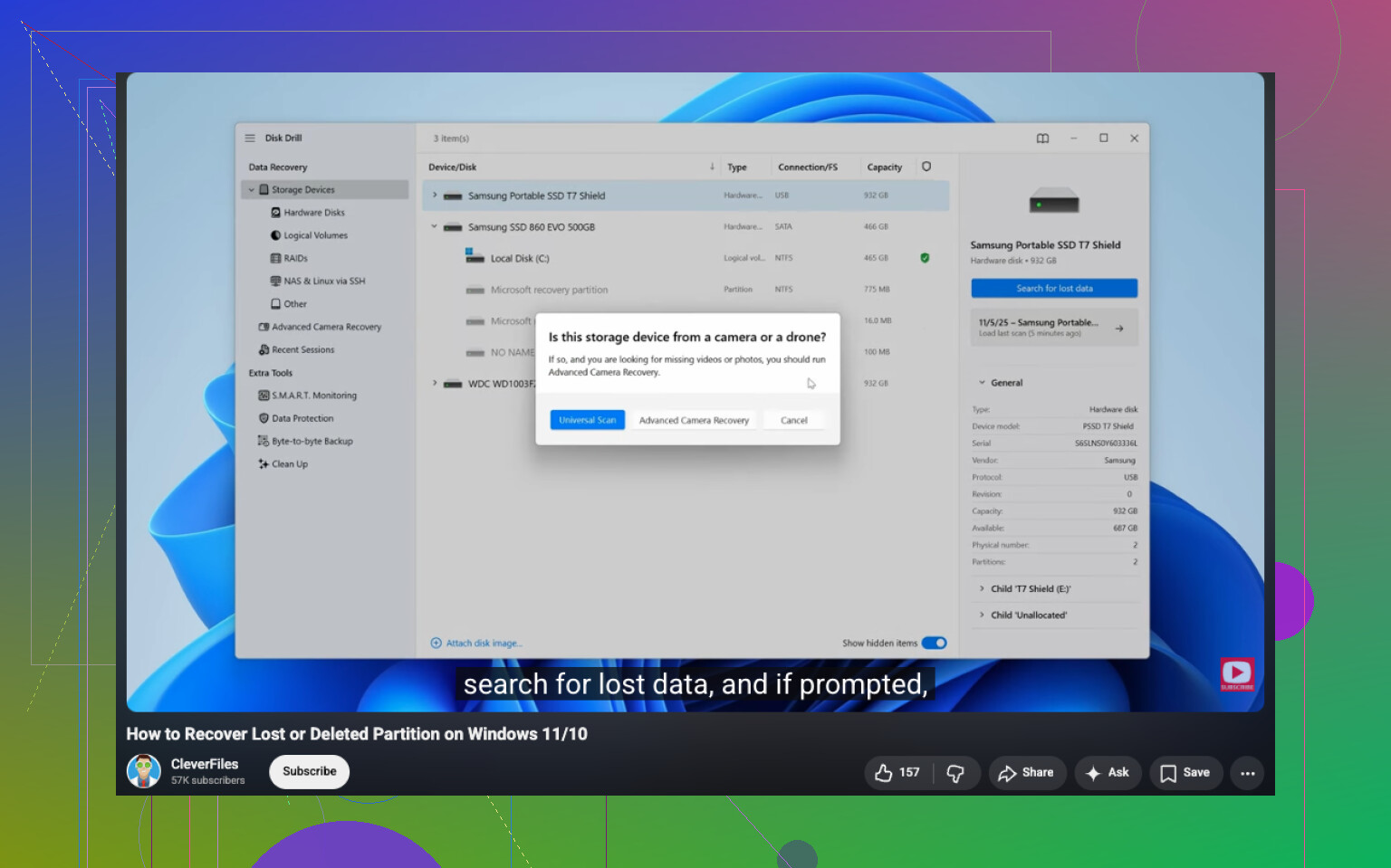
For this step, recovery software is the safer route. I had better luck with Disk Drill than with a few others I tested. It found deleted partitions, kept folder names in a lot of cases, and let me preview files before recovery. That last part saved me time.
If the drive was acting weird before all this, slow reads, random disconnects, clicking, make a full byte-for-byte image first. Scan the image, not the original disk. I learned this one the hard way.
- Try partition recovery only after your data is safe.
If you want the partition restored, not only the files, TestDisk is usually the free tool people reach for. Fair enough. It’s good, but it’s not beginner-friendly. One wrong pick in there and you’ve got a worse mess than when you started. I wouldn’t touch it until my important files were already copied somewhere else.
- Recreate the partition last.
If recovery of the original partition fails, then make a new one in Disk Management, do a quick format, and copy your recovered files back. Last step, not first.
A couple things change the odds.
If you noticed the deletion right away and stopped, your chances are often decent. If you already made a new partition in the same space, or formatted it, recovery gets harder fast because some of the old structure may be gone. Not always all of it, but enough to hurt.
SSDs are trickier too. TRIM can wipe deleted data sooner than an HDD would. It doesn’t always fire the second a partition is deleted, but I wouldn’t count on extra time.
My take is simple. Recover the data first. Repairs come after. That order gave me the best results and kept me from making the drive worse.
13 Likes
Yes. Free options exist. The best known one is TestDisk, but I don’t agree with people who treat it like the first thing every user should run. It works, but the menu flow is easy to mess up if you are stressed and tired.
My take:
-
Check if the partition is missing or only hidden.
If the volume still shows in Disk Management, assign a drive letter first. -
If it shows as unallocated, use a file-focused tool before a partition-table tool.
That is where Disk Drill makes sense. It is safer for normal users, preview is useful, and folder structure recovery is often better than older free tools. Recover the important files to another drive. -
If you want the partition itself back, then try TestDisk.
It’s free, strong, and ugly. Great combo, lol. It does work on many deleted partition cases, espeically on HDDs.
One place I differ a bit from @mikeappsreviewer, I would skip partition restoration entirely if the files matter more than the layout. Pull data first, rebuild later. Faster. Less risk.
Also, if this is an SSD, move fast. TRIM hurts recovery odds.
For a clean walkthrough, this guide to recover a deleted partition is easier to follow:
watch this deleted partition recovery tutorial
Short version, free tool for partition recovery is TestDisk. Safer tool for recovering files from the deleted partition is Disk Drill. If your data matters, I’d start with the second one.
Yes, but I’d split this into two diffrent goals because people mix them up:
- recover the partition entry
- recover the files
For truly free partition repair, TestDisk is still the obvious answer. It can restore deleted partitions on a lot of HDD cases. I partly agree with @mikeappsreviewer and @himmelsjager there. Where I disagree a little is this: if you are not comfortable reading partition tables and sector info, TestDisk can go from “free fix” to “why did I make it worse” real fast.
That’s why I usually tell normal users to think file recovery first, partition recovery second. Disk Drill is better for that side of the job because it’s easier to verify what’s still there before changing disk structure. Even if the free recovery limit is not unlimited on Windows, it’s still one of the safer tools to check what can be recovered.
One more thing nobody mentions enough: look in Device Manager and SMART status before anything. If the drive has hardware errors, recovery software won’t magically fix a dying disk. In that case, clone first if you can.
If you want more comparisons, this thread on best data recovery software for deleted partitions and lost files is worth reading.
Short version:
- Free partition recovery tool: TestDisk
- Safer file recovery option: Disk Drill
- If the disk is unhealthy, stop DIY stuff and image it first
SSD? Move fast. HDD? Better odds, usualy.
I’d add one thing the others only touched lightly: check the partition scheme before you try any recovery. If the disk is GPT and only one entry got deleted, restoring the partition can be clean. If the table itself is damaged, file recovery is usually the smarter play.
I slightly disagree with the “always restore files first” camp. If literally nothing has written to the disk since deletion, a careful partition restore can be faster and preserve everything at once. But that only makes sense if you’re very sure the drive is healthy and you know what partition should be there.
For normal users, I’d verify recoverability before changing anything. That’s where Disk Drill is useful.
Pros of Disk Drill:
- easy to scan and preview
- good for checking whether files are still recoverable
- friendlier than low-level tools
- often keeps folder structure better than old-school utilities
Cons:
- free recovery on Windows is limited
- not truly a partition-table repair tool first
- deep scans can take a while
- less ideal if you want raw control
So my take vs @himmelsjager, @sternenwanderer, and @mikeappsreviewer:
- If you want a completely free tool to restore the partition itself, TestDisk is still the answer.
- If you want the least stressful way to confirm your files are still there, Disk Drill is the better first checkpoint.
- If SMART shows errors or the drive disconnects, stop and clone/image before doing either.
Also, if this was an external USB drive, try connecting it directly to SATA or a different enclosure first. Bad bridge boards can make recovery look worse than it is.