I accidentally deleted important GoPro video files from my SD card while clearing space after a trip, and now I need help figuring out if they can be recovered. The footage includes moments I can’t replace, and I’m looking for the best recovery steps or software that actually works for deleted GoPro files on an SD card.
I messed this up once with a GoPro card, so first thing, stop touching the SD card.
Don’t shoot more clips on it. Don’t format it. Don’t run repair apps yet. Deleted GoPro footage often sits there until new data lands on top of it. Every extra recording cuts into your odds.
Before you run recovery software, I’d check the easy stuff:
If you pay for GoPro’s subscription, sign in and look through your Media Library and the Trash folder. I found missing clips there once after thinking they were gone for good.
Open the card and look for LRV files. Those are the small preview versions. They look worse, sure, but bad footage beats no footage.
If the camera shut off or froze during recording, put the card back in the GoPro. Mine sometimes popped up a repair prompt on startup and fixed the clip on its own.
If the main files are missing from the card, I’d try Disk Drill.
I’ve used it on GoPro footage before, and it did better than a bunch of other tools I tested. GoPro files are annoying because the camera often writes video in scattered chunks across the card. A lot of recovery apps pull pieces back but fail when it’s time to rebuild the video, so you end up with files which look fine at first and then refuse to play. Disk Drill seemed better at reassembling camera footage, and the preview option saved me time because I could check if the recovered clip opened before writing anything out.
A few things I’d do during recovery:
Save recovered files to another drive. Don’t write them back to the same SD card.
When you scan, use Advanced Camera Recovery mode. I missed this the first time. It matters.
If the card throws errors or drops connection mid-read, make a byte-for-byte image first and work from the image instead. Safer. Less stress on the card too.
On Windows, Disk Drill gives you up to 100 MB free for recovery. That’s enough for a quick test so you know if your footage is salvageable before paying.
If you haven’t recorded much new stuff since the clips disappeared, your chances are still decent. Not perfect, but not dead either.
5 Likes
Deleted GoPro files are often recoverable if you stopped using the card fast enough. I agree with @mikeappsreviewer on one thing, stop recording to it. Where I differ is this, I would skip putting the card back in the camera unless you need a clip repair prompt for one unfinished file. Every power-on writes logs and folder changes. Small risk, but still risk.
What I’d do:
- Lock the SD card, if it has a switch.
- Use a card reader, not the GoPro over USB.
- Make an image of the whole card first if the footage matters a lot.
- Scan the image, not the original card.
For GoPro footage, file structure matters. MP4 files often depend on metadata blocks at the end of the file. If deletion happened cleanly, recovery software needs to restore both the video data and the container structure. That’s why random free tools often fail and give you files that show 0:00 length or wont play past a few seconds.
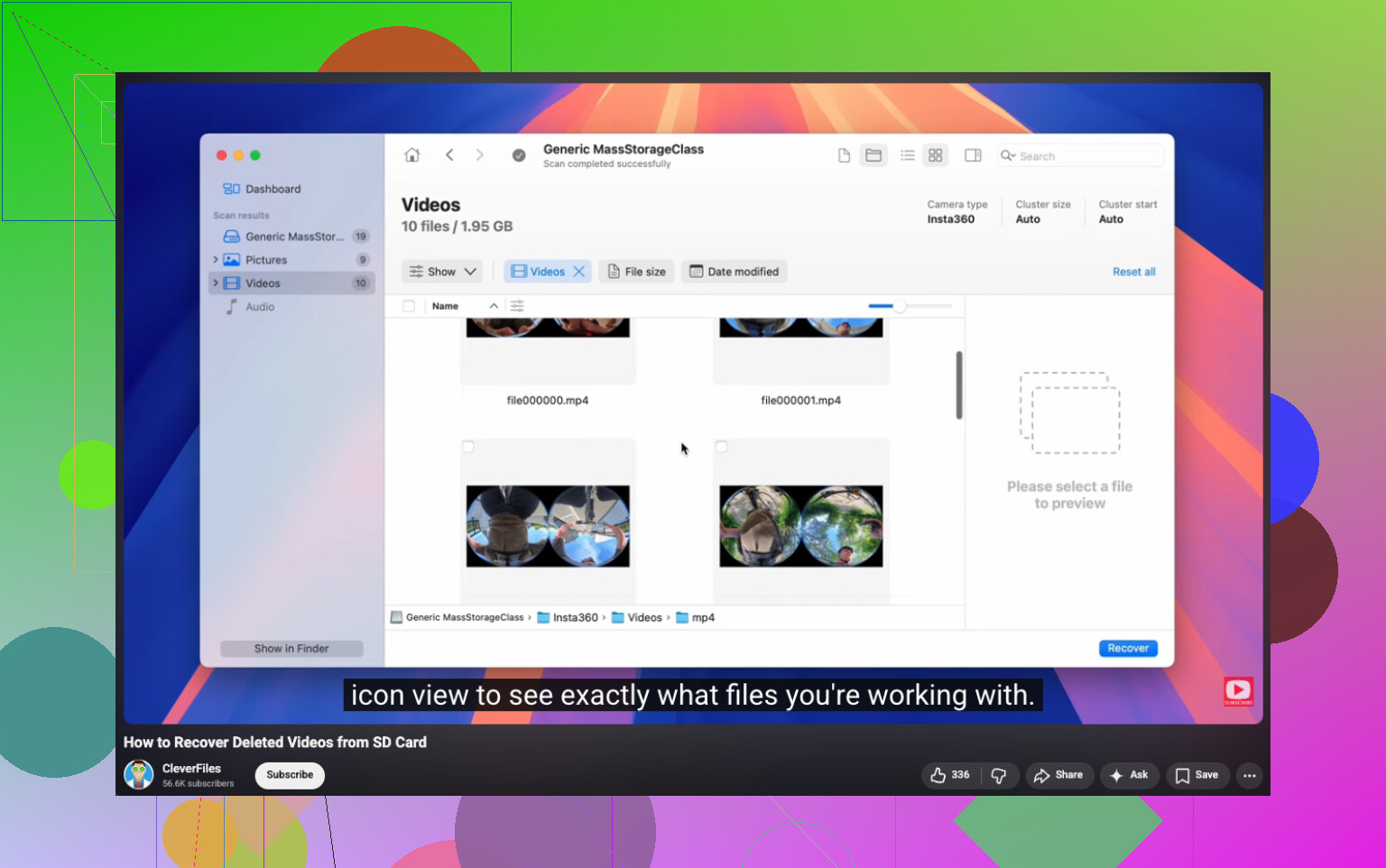
Disk Drill is a solid option here, esp if you need GoPro video recovery from an SD card and want previews before recovery. If the card is healthy, scan for deleted files first. If that misses clips, run a full scan. Save results to your computer, not back to the card.
Also check this video guide, step by step SD card video recovery for GoPro and cameras.
One more thing, if recovery finds .LRV and .THM files, keep them. They help identify clip order and matching footage, even if the full res video is gone. If the card has been reused a lot since deletion, recovery odds drop hard.
I’d add one thing @mikeappsreviewer and @sognonotturno didn’t really stress enough: check whether the “deleted” clips were actually removed by the camera or by a computer. That matters more than ppl think.
If you deleted them on a Mac, sometimes hidden trash folders get involved on removable media. On Windows, you usually won’t get that same safety net, but it’s still worth showing hidden files on the card before doing deep recovery. I’ve seen “missing” GoPro files turn out to be folder weirdness, not true deletion.
Also, don’t get tunnel vision on only .MP4. GoPro sometimes leaves behind fragmented stuff that can still be salvaged with video repair tools after recovery. So if Disk Drill pulls back files that won’t open cleanly, that does not always mean the data is useless. Recover first, repair second.
My order would be:
- Mount SD card read-only if possible.
- Check hidden/system folders from a computer.
- Copy the entire visible card contents to a folder just in case.
- Run Disk Drill against the card or, better, against an image.
- Recover everything to another drive.
- Test recovered MP4s in VLC, not just the default player.
- If clips are broken, try a dedicated MP4 repair app using another GoPro file from the same camera/settings as a reference.
I slightly disagree with putting too much hope into preview files. Nice backup to have, sure, but for important travel footage I’d focus more on recovering the full streams and repairing them after. That’s usualy where the real win is.
If you want more opinions from people dealing with camera card recovery, this thread is pretty relevant: best Reddit discussion on GoPro SD card video recovery software.
Short version: yes, deleted GoPro videos from an SD card can often be recovered, but the less you touched the card after deletion, the better your odds. Disk Drill is a sensible place to start.