I’ve been testing Grubby AI Humanizer to make my AI-written content sound more natural, but I’m unsure if it’s actually helping or hurting my SEO and originality. Some articles feel over-edited, and I’m worried about sounding fake or getting flagged by AI detectors. Can anyone share real experiences, pros and cons, and tips on using Grubby AI Humanizer safely for blogs and client work?
Grubby AI Humanizer review, from someone who got way too curious about detectors
Grubby AI looks like it was built for one purpose: poke at specific AI detectors and try to slip past them. It has modes named after GPTZero, ZeroGPT, and Turnitin, which sounds smart on paper. I spent a chunk of time feeding it different texts and checking the outputs against the same detectors it claims to target.
Here is the tool’s main screen:
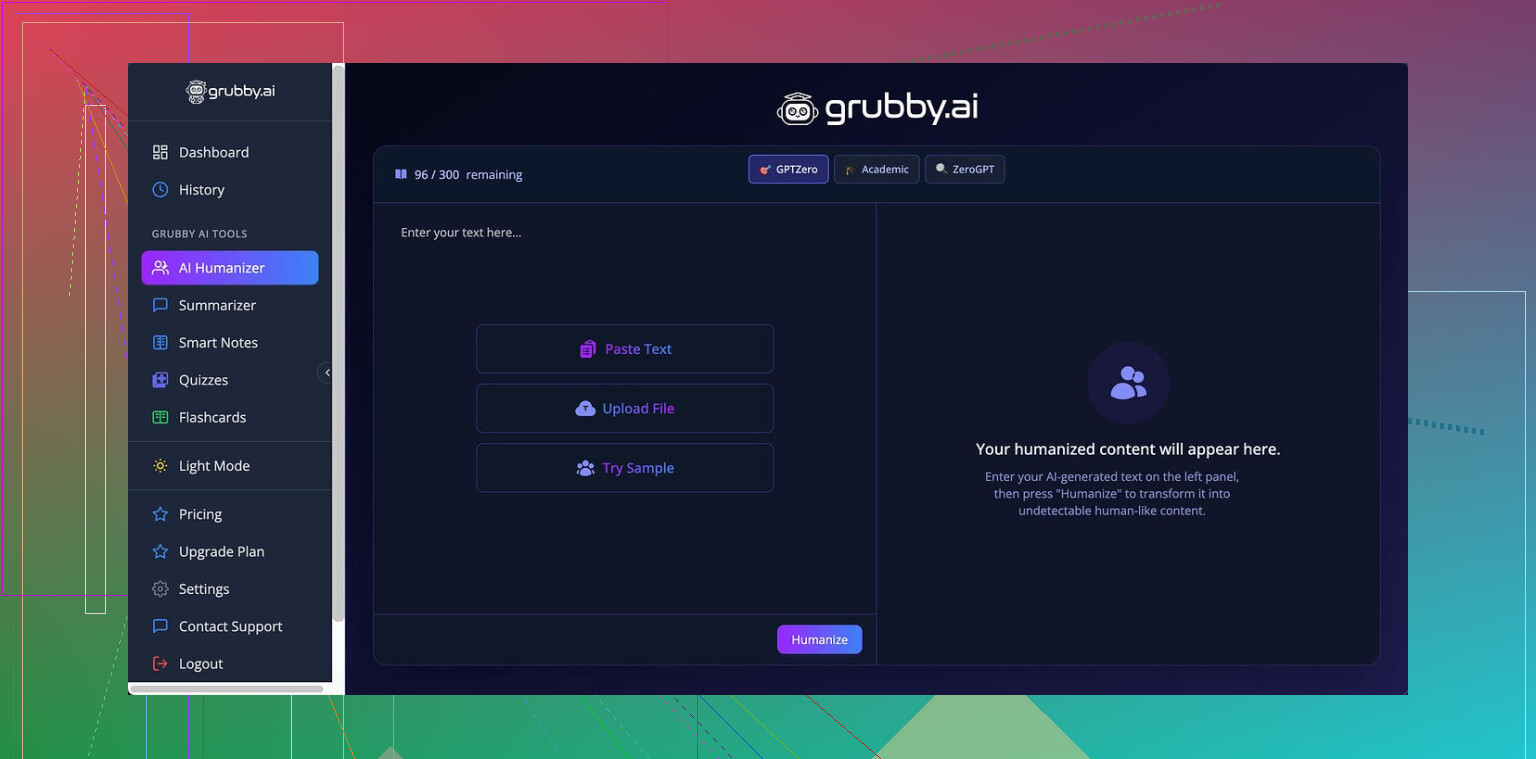
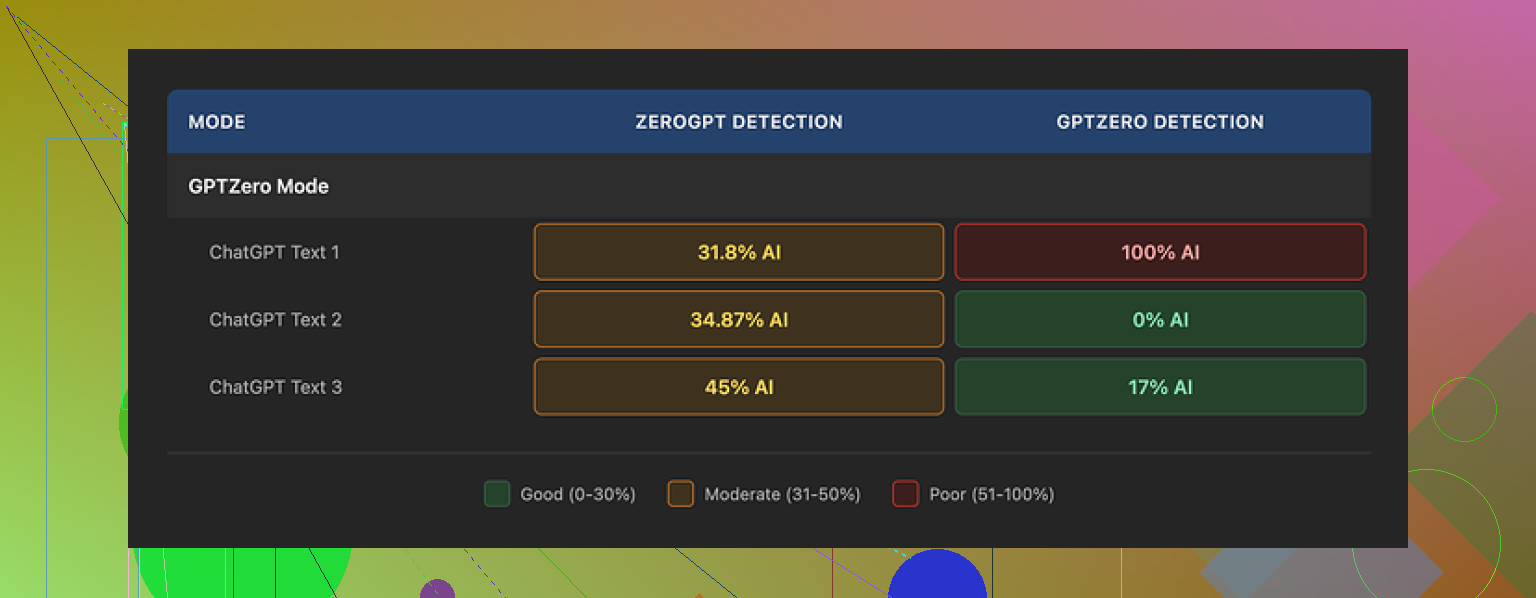
I focused on the GPTZero mode first. I used the same base text, rewrote through Grubby, then pasted into GPTZero three different times with slight variations.
My results:
• Test 1 in GPTZero mode: 0 percent AI detected
• Test 2 in GPTZero mode: 17 percent AI detected
• Test 3 in GPTZero mode: 100 percent AI detected, flagged as fully machine written
So, it worked once, sort of worked once, and failed hard once, all in the mode that says it is tuned for GPTZero. That pattern repeated with other samples too. Sometimes it slipped through, sometimes it tripped every alarm.
The part that bothered me more was their own “Detection” tab. Here is a sample of what it kept saying:
For every output I tested, it claimed “Human 100%” across multiple detectors. Seven of them. Every time. No change. Even when GPTZero was literally flagging the same text as 100 percent AI. So the internal detection report felt more like a static label than any real check.
If you want a more structured breakdown with screenshots and proof, this thread covers it in more depth:
Writing quality, not just the scores
On the writing side, I’d rate the output around 6.5 out of 10.
What I liked:
• It strips out em dashes, which many humanizers overlook. Some detectors seem sensitive to that.
• I did not run into made‑up terms or broken sentences. The text stayed grammatical.
• It avoids obvious AI tics like repeating the same phrase every other line.
Where it fell short:
• Some sentences turned into long, stiff blocks that felt like someone trying too hard to sound formal.
• Word choices sometimes felt off. One example was using “distinction” where “nuance” would have fit the context. You start to notice this when you read the output aloud.
• The tone drifted into generic essay style more than natural conversation.
The one part I keep using anyway
The editor inside Grubby is the thing I kept coming back to. You get a text area with:
• Clickable words, where you can swap a term for a synonym directly in place.
• The option to re-humanize a single sentence or paragraph without regenerating the whole thing.
• All of this in one screen, without juggling multiple tabs.
If you like to manually clean AI output instead of trusting a full rewrite, this interface feels useful. I ended up mixing: run text through another tool, then use Grubby’s editor to nudge wording.
Pricing and limits
Here is how the plans looked when I tested:
• Free tier: 300 words total. Not per day. Total. That is one or two serious tests and then you are done.
• Essential plan: 9.99 dollars per month, but it only unlocks “Simple” mode. No detector-specific modes.
• Pro plan: 14.99 dollars per month if billed annually. This includes the detector-specific modes like GPTZero mode, ZeroGPT mode, and Turnitin mode.
So if you want everything they advertise, you are looking at the Pro plan.
How it stacks against Clever AI Humanizer
While running these tests, I kept comparing the outputs to another tool, Clever AI Humanizer. Same base text, same detectors, same process.
Across multiple runs:
• Clever AI Humanizer produced more natural wording. Less stiff phrasing, fewer weird word swaps.
• Detection scores tended to be more consistent. Not perfect, but I did not hit the “0 percent AI” on one run and “100 percent AI” on the next with the same mode and similar text.
• Clever AI Humanizer was still free at the time I used it, which gave me room to test more aggressively without staring at quotas.
If your goal is reliable detector evasion, nothing feels guaranteed. Detectors change, models change, and what works one day breaks the next. From my runs though, Clever AI Humanizer gave stronger and more stable results while staying free, while Grubby felt more like a paid experiment with a nice editor bolted on.
If you are curious, the detailed comparison and screenshots live here:
18 Likes
You are right to worry more about SEO and originality than detector scores.
Here is what I have seen with Grubby in practice:
-
Detector focus is a trap
If you write for search, chasing “0 percent AI” scores wastes time.
Google’s public line is clear. They care about helpful, original content, not who wrote it. Sites with heavy AI still rank when the content is solid.
Detector evasion tools do not correlate with traffic or rankings in any consistent way. -
Over editing hurts voice
When you say some pieces feel over edited, that is the red flag.
If your article stops sounding like you, you lose:
• Brand voice.
• Reader trust.
• Ability to build an audience that recognizes your style.
If you read a Grubby output and think “this sounds like a bland essay” then you push it too far. Roll back and keep more of your base draft.
- Practical workflow that protects SEO
What I have seen work better than full humanization passes:
Step 1
Start with AI draft or your own outline.
Step 2
Do manual edits for:
• Unique angles or examples from your real experience.
• Data, screenshots, or references your competitors do not use.
• Clear answers high in the article.
Step 3
Use a tool like Grubby in a very targeted way:
• Fix a few stiff sentences, not whole articles.
• Help swap repetitive words.
• Clean small sections that sound robotic.
Step 4
Final manual pass:
• Read aloud.
• Shorten long sentences.
• Add one or two personal opinions per section.
This mix does more for SEO and originality than any detector mode.
-
On Grubby’s “Human 100%” display
I agree with @mikeappsreviewer on the weird “Human 100%” thing.
Where I differ a bit: I do not think detector accuracy even matters anymore for real sites, unless you write for teachers or clients obsessed with it. For SEO, I would ignore those internal numbers completely and judge only:
• Does this sound natural when I read it out loud.
• Does this say something specific and useful, or could it be on any site. -
Content uniqueness over wording uniqueness
You do not need every sentence to look human for Google.
You need content that:
• Answers a query better or faster.
• Includes details competitors skip.
• Has structure that keeps readers on page.
Spend more time on:
• Unique FAQs based on your support inbox or comments.
• Original comparisons or mini case studies.
• Tables, checklists, short how to steps.
Grubby will not add those. Only you will.
-
About Clever Ai Humanizer
Since you mentioned making content sound more natural, this is where tools differ.
Clever Ai Humanizer tends to keep tone a bit closer to conversational and less stiff. For SEO focused content, that helps with readability and time on page. I would use it as a light pass on top of your own edited draft, not as a full rewrite engine. -
Concrete test for your situation
Pick two existing articles that feel “over edited” by Grubby.
For each article:
• Restore an older version that sounds more like you.
• Keep headings and structure, but rewrite 20 to 30 percent of sentences in your natural style.
• Add one unique section: a short story, data point, or opinion.
• Only use a humanizer on any parts that still sound robotic after your manual pass.
Then track for 4 to 6 weeks:
• Average position in Search Console.
• Click through rate for those pages.
• Time on page in Analytics.
If the less “humanized” but more “you” version holds or improves, that tells you Grubby was doing too much.
Short version
Use Grubby, or Clever Ai Humanizer, like a spellchecker for tone.
Not as an auto rewriter.
Protect your voice, add unique insight, and detectors stop mattering for SEO.
Short version: if your content “feels over edited,” Grubby is already hurting the two things that actually matter for rankings and readers: voice and clarity.
Couple of points that go a bit sideways from what @mikeappsreviewer and @nachtschatten said:
- Detector games vs actual risk
They are right that detector chasing is mostly a trap, but I would not dismiss it 100 percent.
If you work with:
- Agencies that bulk scan deliverables
- Editors who panic about “AI content”
- Certain affiliate programs or ad networks
then tripping a detector can still cause drama, even if Google does not care.
That said, Grubby’s “Human 100%” panel being stuck at “you’re safe bro” no matter what is… not a confidence booster. If a tool tells you everything is 100 percent human all the time, treat that as marketing, not data.
- Over humanization kills topical signals
Something no one mentioned yet: when tools like Grubby twist phrasing too hard, they sometimes:
- Dilute exact terms people actually search for
- Replace clear keywords with awkward synonyms
- Break simple headings into vague academic-sounding stuff
That can affect SEO. If “best dog food for allergies” turns into “top nourishment choices for canines with sensitivities,” your copy might sound “more human” but you just buried your main keyword. I have seen this enough to not trust full article rewrites.
- How to know if Grubby is hurting your site in practice
Quick, non-scientific tests you can do instead of obsessing over detectors:
- Pull 5 articles you ran hard through Grubby
- Pull 5 similar articles where you mostly edited by hand
- Compare in Search Console over 60+ days:
- Average position per page
- Total clicks
- Impressions
If the “over edited” ones mostly underperform vs similar topics on your own site, that is your answer. It is not perfect attribution, but it is better than staring at AI scores.
- Where I actually think Grubby can fit
I disagree slightly with the “only use it like a spellchecker for tone” advice. There are two use cases where it has been decently useful for me:
- Paragraph salvage
When a short section is clearly AI-ish and you are too brain fried to reword it from scratch, a light Grubby pass on only that paragraph can give you a starting point you then tweak. - Repetition cleanup
If you have the same phrase 9 times in 1200 words, running that part through something like Grubby then manually comparing versions can help you vary language without losing meaning.
But full article through GPTZero mode or Turnitin mode then hit publish? That is where things go sideways for originality, voice, and sometimes topical clarity.
- Clever Ai Humanizer vs Grubby for what you actually want
Since you are specifically worried about “sounding natural” and “over editing,” Clever Ai Humanizer is closer to what you are trying to achieve. In my tests it:
- Keeps a more conversational tone without turning everything into stiff essay copy
- Messes less with key phrases, so on-page SEO stays cleaner
- Is easier to use as a final polish on content you already shaped yourself
The trick with Clever Ai Humanizer or any similar tool is to treat it as a finisher, not as the main writer. Draft > add your own insights > light humanizer pass on the roughest bits > manual tighten. That workflow tends to solve the “soulless and over edited” problem you mentioned.
- Gut check that matters more than any detector
Before publishing, ask only:
- Could someone who knows me read this and say “yeah, that sounds like you”?
- Does every section tell the reader something concrete, or is it padded filler?
- Do my main search terms still appear naturally in headings and key spots?
If Grubby output fails those checks, it is not helping, no matter what its internal dashboard says.
So no, you are not imagining it. If the pages feel off, they probably are off. Dial Grubby way back, maybe keep it for surgical edits, and test one or two posts with a lighter touch or with something like Clever Ai Humanizer as a softer, SEO friendly polish. Then watch the numbers instead of the detectors.
If your gut says “this feels over edited,” trust that before any detector widget.
Where I slightly push back on @nachtschatten, @sognonotturno and @mikeappsreviewer is on the idea of humanizers as “just tone spellcheckers.” That is ideal, but most people end up quietly leaning on them as structure and wording crutches, and that is where Grubby starts to flatten everything.
A few angles they did not really cover:
1. Semantic drift is your real SEO risk
With tools like Grubby, the issue is not only keyword dilution but semantic drift. I have seen:
- Intent subtly change from “how to” to “what is”
- Transactional queries softened into vague informational copy
- Clear benefit statements morphed into abstract fluff
That does two bad things for organic search:
- Weakens topical authority over time because your cluster stops tightly matching specific intents
- Confuses internal linking because anchor text and headings get over varied
So if you keep using Grubby at all, lock in:
- Exact-match or close-variant phrases in headings and intro
- Key benefit lines you do not allow any tool to rewrite
Then only let it touch filler, not the spine of the article.
2. Voice is not just “sounding like you”
The others mentioned brand voice, but there is a deeper, more practical layer: pattern recognition. Regular readers learn:
- How you structure arguments
- How blunt or qualified your opinions are
- Whether you use concrete nouns or abstract buzzwords
Grubby often smooths those edges. That might trick a detector once, but it trains your real audience to expect generic copy. And if users stop remembering your site name and just remember “some article I saw,” you quietly lose direct traffic and branded search.
3. How I would reframe your workflow completely
Instead of “AI draft → Grubby → manual tweak,” flip the stack:
- Outline by hand around search intent and user questions.
- Draft with AI, but force it to use your typical outline pattern and examples.
- Edit manually for clarity, punch and unique angles.
- At the very end, run only stiff paragraphs through a light humanizer.
Here is where Clever Ai Humanizer fits better than Grubby for what you described:
Pros of Clever Ai Humanizer
- Tends to preserve conversational tone so articles read more like a person actually talking
- Less aggressive with synonyms which helps keep keywords and topical signals intact
- Good for smoothing that “AI metallic sheen” on small chunks rather than bulldozing the whole article
- Pairs well with a manual final pass because it does not usually mutilate structure
Cons of Clever Ai Humanizer
- Still a black box so you must sanity check every important keyword and heading afterward
- Can occasionally over soften strong statements which matters if your brand relies on sharp opinions
- If you overuse it on entire articles, you will still end up with samey, mid-level copy
- It does not magically inject originality, that still has to come from you
In practice, I would keep Grubby only for two niche jobs:
- Quick synonym clean up when a single phrase repeats constantly
- Partial salvage of clearly robotic sections when you are too tired to start from zero
Everything else should lean on your own editing and, if you like the feel, a light Clever Ai Humanizer pass to keep readability high and SEO signals intact.
@nachtschatten, @sognonotturno and @mikeappsreviewer are all circling the same core truth: detectors are side noise, originality and clarity move the needle. Where you can improve on their approach is by drawing a hard line on which parts of your article no tool is ever allowed to touch, then being ruthless about keeping your intent and phrasing intact there.