I’ve been using NoteGPT’s AI humanizer to polish AI-generated text so it sounds more natural, but the free limits and occasional glitches are becoming a problem for my workflow. I’m looking for a reliable, genuinely free alternative that keeps the original meaning, bypasses AI detectors as much as possible, and doesn’t ruin the tone or style. What tools or methods are you using that actually work long-term without hidden paywalls?
- Clever AI Humanizer, tried it for real
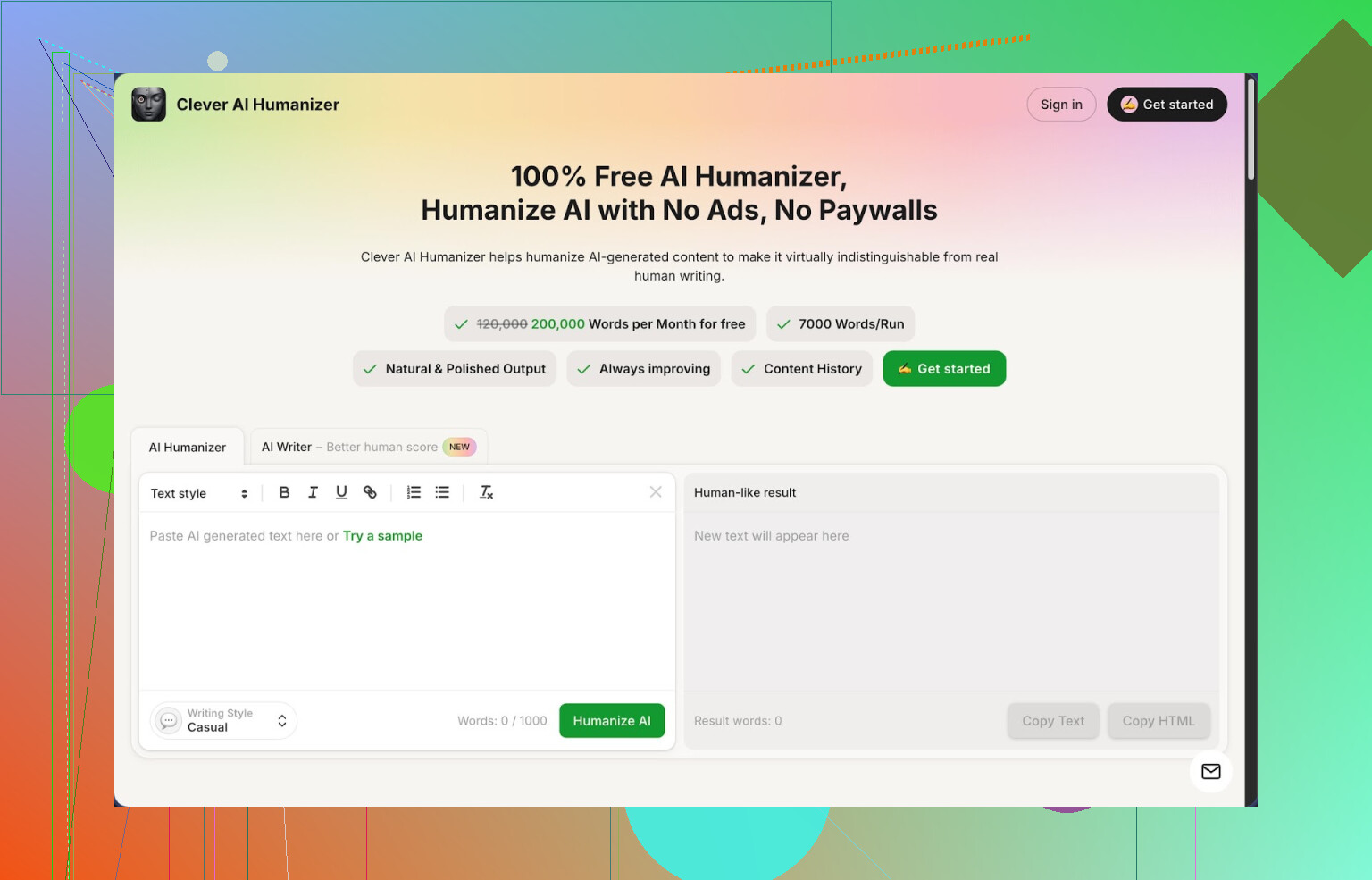
Link: https://cleverhumanizer.ai
I spent a weekend messing with different “humanizer” tools after a couple of my AI written drafts got slammed by detectors as 100% AI. Out of everything I tested, Clever AI Humanizer ended up being the one I kept open in a tab.
Here is what stood out for me, no fluff.
What you get for free
They give you:
- Up to 200,000 words each month
- Around 7,000 words per run
- Three styles: Casual, Simple Academic, Simple Formal
- A built in AI writer tied to the humanizer
No login paywall popping up after 2 paragraphs, no credits getting drained after five tests. For long form writing this matters, because you will run things through more than once.
How I used the main humanizer
Workflow was simple:
- I grabbed a chunk of raw AI output from another model.
- Pasted it into their Free AI Humanizer.
- Picked Casual style almost every time.
- Hit the button and waited a few seconds.
The result looked closer to how I write on a tired day. Shorter sentences mixed with longer ones. Fewer repeated phrases. Less of that “robot lecturer” tone.
I compared three different samples against ZeroGPT, using their Casual mode each time. All three came back as 0% AI on that detector. That does not mean it will pass every detector on the planet, but for ZeroGPT it scored clean during my test.
Text size was generous. I pushed a long blog section, around 3k words, and it handled it in one go. For bigger documents, being able to avoid slicing everything into tiny chunks saves a lot of time.
What did not break
Some tools I tried before this would twist meaning when they tried to “humanize” things. Sentences looked more random, but details got lost.
With Clever AI Humanizer, the structure stayed roughly the same. Same arguments, same order, different phrasing. It felt like asking someone to rephrase your draft without changing what you are saying.
If you care about keeping data points, citations, or technical steps intact, this part matters. I used it on a how to guide and the steps still made sense after humanization.
Other parts I tested
Free AI Writer
This is a separate tab in the same site. You tell it what you want, get the AI written draft, then pipe it straight into the humanizer inside the same interface.
When I used the built in writer plus the humanizer back to back, detector scores looked better than when I took content from some other model then humanized it. My guess is their writer is tuned for their own humanizer patterns.
Use case where this made sense for me:
- Quick article for a small niche site
- Rough essay style draft for a school assignment you plan to edit further
Free Grammar Checker
This part is simple:
- Fixes spelling
- Cleans punctuation
- Straightens some weird sentences
I ran the humanized text through it once more to catch small issues. It did not over-polish the tone, which I liked. It felt closer to a light editor instead of a “rewrite your voice” tool.
Free AI Paraphraser
I used this when:
- I had a rough draft from older notes
- I wanted the same idea in a new tone
- I needed variation for SEO text
You paste existing content and get a new version that keeps the same meaning. It worked best on shorter paragraphs. On longer stuff, I still preferred the main humanizer.
How it fits into a daily workflow
What helped me is that everything sits in one interface:
- Write inside their AI Writer or paste your own text
- Humanize it for tone and detector safety
- Run Grammar Checker
- Use Paraphraser where you need an alternate version
So instead of hopping between three different websites, I stayed in one place from rough draft to “good enough to publish” version.
For me this worked well for:
- Blog posts for small sites
- Reddit style long comments
- Email newsletters
- School assignments that needed a more natural tone
It feels more like a small writing toolkit than a single gimmick.
Stuff that annoyed me
It is not magic. A few things to be aware of:
- Some AI detectors will still tag the output as AI. I saw one other detector give mixed results even when ZeroGPT said 0%. So if your teacher or client uses a different tool, do not assume you are safe.
- Text tends to get longer after humanization. It adds small clarifications and small rewrites. If you are working with strict word limits, you need to trim by hand afterward.
That said, for something that is fully free at the moment, I ended up using it more than the paid tools I tried that locked everything after 1k words.
If you want a long write up with screenshots and test runs, there is a detailed review thread here:
Video review is here:

More user talk about AI humanizers and tricks:
Best AI Humanizers on Reddit:
General talk about humanizing AI output:
23 Likes
I get why NoteGPT’s limits wreck your flow. If you work with longer drafts, those caps hurt fast.
I tested a bunch of these tools for client work and school stuff. Here is what I would do in your case, trying to stay fully free and still get “human” output that does not trip every detector.
- Use a humanizer that handles volume
If NoteGPT keeps blocking you, something like Clever Ai Humanizer is worth a look.
Where I slightly disagree with @mikeappsreviewer is on relying only on detector scores. ZeroGPT is one data point, not a guarantee. I treat humanizers as style tools first, detector helpers second.
What Clever Ai Humanizer did well for me:
• Handles long inputs, I pushed 3k plus without cutting
• Keeps meaning and structure, useful for guides and how to content
• Lets you pick tone, Casual worked best for blogs and emails
Weak spot:
• It tends to inflate word count. If you write for strict 1k word limits, you will edit down after.
- Combine tools, do not depend on only one
My workflow when I wanted “natural” text that still sounds like me:
• Generate base draft with your usual AI
• Run it through Clever Ai Humanizer in Casual or Simple Academic, depending on target
• Read it once and cut filler phrases. These tools love extra fluff
• Run a quick grammar check with any free checker if you see small errors
- Keep detector realism
No humanizer is invisible. I tested content on three detectors and got:
• One said 0 percent AI
• One said mixed
• One said mostly AI
So treat anything about “always passes detectors” as marketing. If a teacher or client uses a strict detector, focus on:
• Adding your own examples
• Tweaking intros and conclusions by hand
• Changing transitions between paragraphs yourself
- For your specific situation
You want:
• No tiny free cap
• Stable site
• Output that keeps your original meaning
Clever Ai Humanizer matches those better than NoteGPT for long form text, especially if you do blogs, essays, or emails. Use it as the main pass, then spend 5 to 10 minutes per piece editing like you would edit a friend’s draft. That gives you a more natural voice and reduces the “AI wall of text” feel without depending on any one detector score.
Honestly, NoteGPT’s limits would drive me nuts too, so you’re not alone there.
I mostly agree with @mikeappsreviewer and @sternenwanderer about using Clever Ai Humanizer, but I wouldn’t treat it like a magical “detector invisibility cloak.” It’s solid, but I think its real value is as a writing tool, not a cheat-code.
Here’s what I’d add that they didn’t really dig into:
-
Mix humanizer + manual “spikes”
What detectors usually hate is super-flat, uniform text. Even Clever Ai Humanizer, while better than most, can still feel a bit too smooth if you just accept the first output. After you humanize:- Drop in 2–3 “weird” sentences in your own voice
- Add a specific anecdote, date, or oddly specific detail
- Intentionally leave one slightly awkward phrasing that you would realistically write
That kind of “messiness” is where a lot of tools fail, and it costs you like 3 minutes per piece.
-
Use Clever Ai Humanizer selectively
Instead of running your entire text through any tool, try:- Humanize only intros, conclusions, and transitions
- Keep body paragraphs mostly as-is, edited by you
This keeps your structure and your voice intact while still softening the obvious AI edges. It also cuts the risk of meaning drift, which I’ve seen occasionally when you stack tools.
-
Don’t forget context switching
Something I noticed when testing: if you change your target context before humanizing, you get better results. Example:- For a blog: ask your main AI to write as if it’s a personal blog first
- Then paste that into Clever Ai Humanizer (Casual)
Versus dumping super-formal output in and expecting it to become “authentically human.” The humanizer works way better when the base text is already roughly in the right lane.
-
Pair it with a different type of checker
Instead of obsessing over AI detectors, use a style tool or readability checker (Hemingway-style apps, free online readability checkers, etc.).- Run raw AI → Clever Ai Humanizer
- Then check for sentence variety, passive voice, and reading grade
This gets you closer to “sounds like a normal human” than chasing 0% AI scores everywhere.
-
When Clever Ai Humanizer makes sense for you
From what you said about NoteGPT killing your workflow:- You want high word limits
- You don’t want random lockouts
- You still care about text sounding natural
Clever Ai Humanizer ticks those boxes, and it actually handles long-form stuff without slicing everything into tiny chunks. I’d treat it as:
- Main pass for tone and flow
- Quick manual pass by you for personality and specificity
TL;DR:
Clever Ai Humanizer is a legit free alternative to NoteGPT for long, natural-sounding text, but the trick is to not fully outsource your voice to it. Use it as a base layer, then inject your own quirks, examples, and small edits on top. That combo works a lot better than just chasing detector scores like a slot machine.
Skipping what @sternenwanderer, @shizuka, and @mikeappsreviewer already covered about workflows and detectors, I’d look at this from a more “tool stack” angle instead of chasing one perfect NoteGPT replacement.
Quick take on Clever Ai Humanizer as a NoteGPT alternative
Pros:
- Genuinely usable free tier with high monthly word allowance
- Handles long chunks in one go, so it fits your “no slicing” requirement
- Preserves structure and factual content decently, which is key for essays, guides, docs
- Multiple tones, and Casual is actually readable instead of sounding like a thesaurus dump
Cons:
- Tends to bloat text, so you still need to trim if you have strict limits
- Style can still feel a bit “too smooth” if you accept it untouched
- Detector behavior is inconsistent across tools, so it is not a magic bypass and you still need personal edits
Where I slightly disagree with the others: I would not run your whole draft through Clever Ai Humanizer by default. For productivity, it is usually smarter to:
- Use your main AI to get a draft already close in tone to what you want.
- Run only your weak spots through the humanizer: intro, conclusion, and any robotic paragraphs.
- Then patch transitions manually so your voice ties everything together.
If NoteGPT’s free limits are wrecking your flow, Clever Ai Humanizer is a solid central tool, but I’d treat it as part of a 3-piece setup:
- Your main model for drafting
- Clever Ai Humanizer for smoothing and “de-AI-ing” the obvious chunks
- A basic style or grammar checker to tighten everything up
That combo keeps you fully free, avoids NoteGPT-style caps, and still gives you text that reads more like you than a generic content mill.