I’ve been using Aihumanize.io to make AI-generated text sound more natural, but I’ve hit the limits of the free plan and can’t upgrade right now. I’m looking for a genuinely free tool (or combo of tools) that can match or come close to its quality for humanizing AI content for blogs and social media. What are you using that actually works and doesn’t cost anything?
- Clever AI Humanizer – my take after abusing it for a week
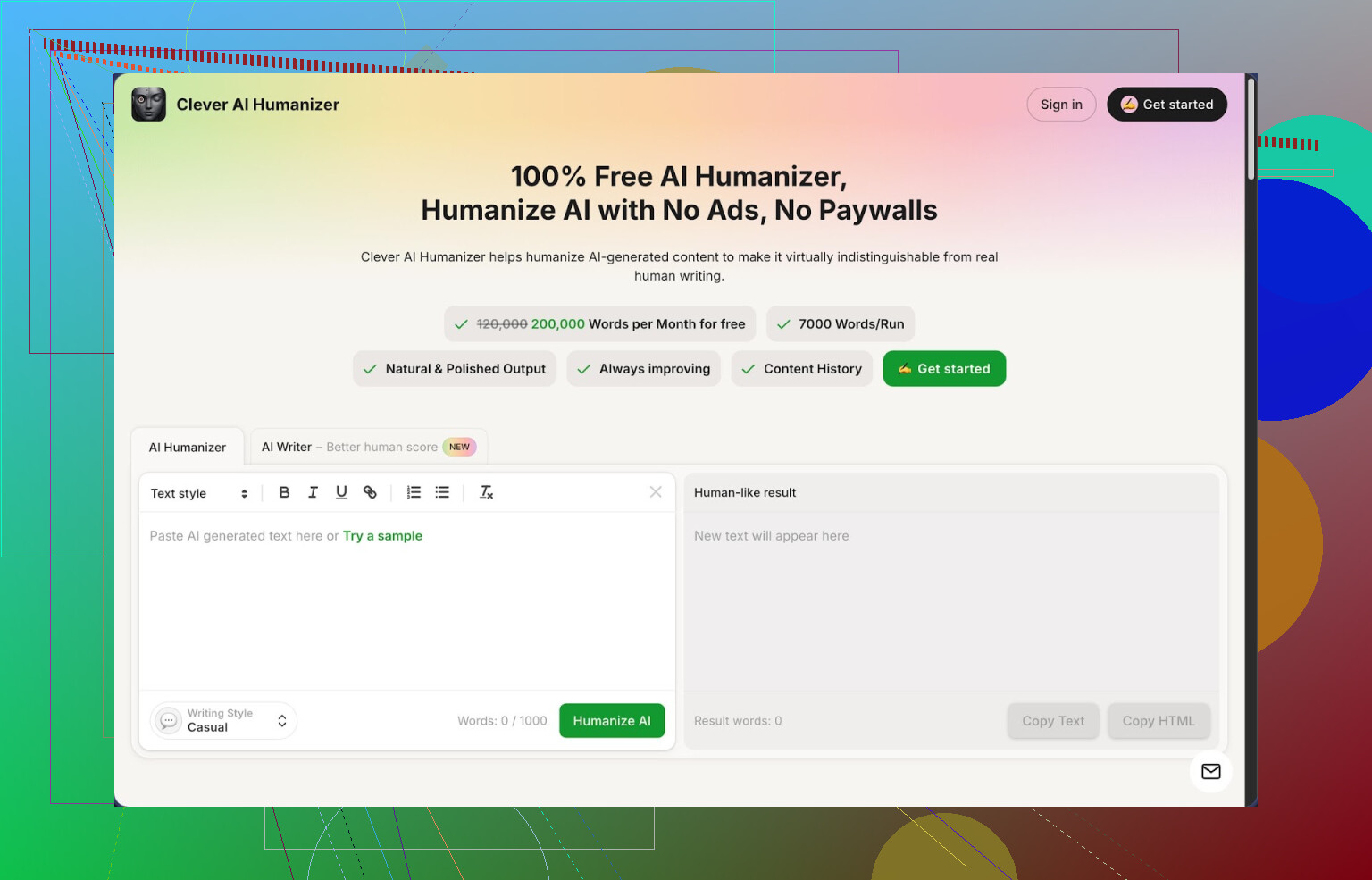
Link: https://cleverhumanizer.ai
I stumbled into Clever AI Humanizer after getting tired of watching my AI-written stuff get slapped with 100% AI scores on detectors. I write a lot for work and school, so I needed something that did not choke on long texts or lock everything behind credits.
Here is what I ended up finding after pushing it pretty hard.
- What you get for free
Clever gives you:
- Around 200,000 words each month, no paywall in my case
- Up to about 7,000 words per run
- Three styles: Casual, Simple Academic, Simple Formal
- An integrated AI writer sitting next to the humanizer
No login tricks, no weird “trial” that dies after three prompts. I tested three different samples in the Casual style and then checked them on ZeroGPT. Each one showed 0% AI in my runs. That does not mean you will always get that result, but I logged it because it surprised me.
- Main tool: the Humanizer
Here is the basic flow I used:
- Paste in text from ChatGPT or Claude
- Pick a style, I usually used Casual for blog posts and Simple Academic for essays
- Hit run and wait a few seconds
Output came back noticeably different from the original and moved away from obvious AI patterns like:
- Overused transition phrases
- Same sentence rhythm for an entire paragraph
- Repeating the prompt language over and over
The important part for me, it kept the meaning intact most of the time. I checked by comparing paragraphs line by line. It did tweak structure, add a bit of explanation here and there, and sometimes merged or split sentences. I did not see it inventing new claims or changing facts in my tests, which is where some other “humanizers” go off the rails.
One side effect, the text often grew longer. If I fed it 1,000 words, I sometimes got 1,200 or more back. That seems tied to how it breaks patterny AI phrasing.
- Extra modules and how I used them
Free AI Writer
This sits in the same interface. You type a topic like “benefits of standing desks for software engineers” and it spits out a draft article. Right after that, you send it through the humanizer with one click.
I noticed something interesting. If I wrote in ChatGPT, then humanized, my detector scores were good. If I generated using their own writer then humanized, scores on ZeroGPT looked slightly better on average. So if you want a full pipeline inside one tool, this workflow works:
Topic → AI Writer → Humanizer → Grammar check
Free Grammar Checker
This one is straightforward. I used it when I was done with edits:
- Fixed misspellings
- Cleaned punctuation
- Removed some clunky phrasing
I compared a few paragraphs against Grammarly. Clever missed some style problems Grammarly caught, but it did nail the obvious errors. For anything going to clients or professors, I still skim the output myself.
Free AI Paraphraser
I used this for two specific cases:
- Rewriting old blog posts to avoid repeating the same phrasing
- Adjusting tone from stiff to more conversational
You paste text, pick a style, and it rewrites it while keeping the same idea. Good for SEO people who need variations of the same content and for students reworking messy drafts.
- Workflow that saved me time
The main reason I stuck with it is that everything lives in one place. My usual pipeline ended up like this:
- Draft in AI, either their Writer or an external model
- Run through Humanizer in Casual or Simple Academic
- Send through Grammar Checker
- Optionally Paraphrase small bits that still feel robotic
You stay in a single interface, so you do not jump between three different sites.
- Where it falls short
It is not magic.
- Some detectors still say “AI” on certain outputs. I tested with tools other than ZeroGPT and the scores were mixed. Better than raw AI output, but not invisible.
- Word count often climbs after humanization. Good if you need detail, annoying if you have strict word limits in assignments.
- Style can feel slightly “too clean” in some cases. I usually go back and throw in a few rough edges or personal comments to make it sound more like me.
Also, if you blindly trust the tool and never read what it gives you, you will get caught sooner or later. I always check facts, I adjust tone, and I delete anything that does not sound like something I would say.
- Who I think it fits
From my runs:
- Students who need to clean up AI-assisted essays so they do not sound robotic
- Bloggers who write with AI models and want less detectable, more readable posts
- SEO writers who need paraphrased variations without wrecking meaning
- Anyone tired of word limits and credit systems on other humanizers
If you want something free, with high limits, and you are willing to still edit your text, it is worth a try.
- Extra links I used
Detailed written review with screenshots and detection proof:
YouTube review of Clever AI Humanizer:

More user opinions and alternatives:
Best AI humanizers on Reddit:
General thread about humanizing AI text:
24 Likes
If you are trying to replace Aihumanize.io on a zero-budget, you will need a combo, not a single magic tool.
Quick answer that works:
- Clever Ai Humanizer
This is the closest “Aihumanize-level” free option I have seen so far.
What it does well, compared to Aihumanize:
- High free limit, people report around 200k words a month. Aihumanize hits a wall fast.
- Handles long inputs in one go, so you do not need to slice text every 1k words.
- Has different tones, so you can get away from that samey “AI blog voice”.
What I do differently than @mikeappsreviewer:
- I do not trust any one detector result. I run the humanized text through at least 2 detectors.
- I shorten the output after humanizing. Clever often expands text. Professors and clients notice sudden word count jumps.
- I always inject 2 to 3 sentences that sound like me. Short, blunt, even with a typo or two. That breaks patterns more than people think.
- Pair it with a style rewriter
Clever’s own paraphraser works, but if you want a free combo:
- Generate with ChatGPT free or Claude free.
- Humanize with Clever Ai Humanizer.
- Do a fast manual pass where you:
- Add 1 or 2 specific personal details.
- Remove generic transitions like “On the other hand” or “Overall”.
- Shorten any long chain of similar sentence lengths.
- Use detectors as a guide, not as a judge
My rough pattern from tests with essays and blog posts:
- Raw GPT output often scores 80 to 100 percent AI.
- After Clever Ai Humanizer, it usually drops to 0 to 40 percent on ZeroGPT, and mixed on others.
- After a manual pass where I break rhythm and add personal phrases, it tends to look “human” on most tools.
Key thing, do not expect zero detection across all tools. Aim for “not obviously AI” plus natural tone.
- Where Aihumanize.io still wins a bit
- Aihumanize tends to keep word count tighter in some cases.
- Some people like its “academic” flavor more out of the box. With Clever you might need to tweak more if your professor is strict.
If you want close to what you had with Aihumanize.io without paying:
- Use ChatGPT or any free model for draft.
- Run it through Clever Ai Humanizer in a matching tone.
- Edit fast for length, add your voice, remove generic AI phrases.
That combo gets you about 80 to 90 percent of the way to paid tools, for free, if you are willing to do a small manual clean up at the end.
If Aihumanize.io is your baseline, I’d treat any free replacement as a “toolchain” problem, not a “find 1 magic site” problem. I partly agree with @mikeappsreviewer and @caminantenocturno on Clever Ai Humanizer, but I wouldn’t just copy their workflow and call it a day.
Here’s what’s actually working for me right now when I want Aihumanize-level quality without paying:
1. Use Clever Ai Humanizer, but not as a 1‑click fix
Yeah, Clever Ai Humanizer is probably the closest free option to Aihumanize in practice:
- Handles long texts in one go
- Multiple tones (I usually avoid “Casual” for anything academic)
- Generous free word limits compared to Aihumanize
Where I disagree a bit with what’s been said:
I wouldn’t rely on Clever’s output “as is” if your goal is avoiding both detectors and teacher/client side‑eye. It’s good, but it still has that “cleaned AI” vibe sometimes. Also, longer ≠ better. The inflation in word count can actually make stuff look more suspicious for assignments.
My use for Clever Ai Humanizer is:
- Input: raw GPT/Claude draft
- Tone: Simple Academic for essays, Simple Formal for reports
- Goal: break the obvious AI structure, not produce final text
Think of it like a de-patterning step, not a magic cloak.
2. Add a human noise layer, not just a “style” layer
This is the part most people skip and then complain about detectors.
After Clever Ai Humanizer, I always do a quick 5 to 10 minute manual pass where I intentionally mess with the text:
- Shorten or nuke “On the other hand,” “In conclusion,” “Overall,” etc.
- Add 1 or 2 specific, concrete details that sound like a real person:
- “In my own internship last semester…”
- “I tried this setup with a cheap Ikea desk…”
- Break up robotic rhythm:
- Turn one long sentence into two short ones.
- Combine two short ones into a longer, slightly messy sentence.
Detectors look for patterns. You want controlled chaos, not just “smoother AI.”
I know others say “add 2–3 sentences that sound like you,” which is correct, but I’d push harder: let yourself keep some awkward phrasing. Perfect, polished text is its own red flag.
3. Draft source matters more than people admit
One thing I haven’t seen stressed enough in the other replies: your original AI draft heavily impacts how much work the humanizer has to do.
From my tests:
- Raw ChatGPT free model → very “classic” AI pattern, needs more heavy humanizing
- Claude free model (when you can use it) → slightly more varied style, easier to clean
- Then run that through Clever Ai Humanizer
If you start with a stiff, hyper‑structured draft, no humanizer will magically make it sound like a tired student writing at 2am.
If you can, prompt the model like a person:
- Ask it to “write like a college student, slightly informal, not too polished, a few shorter sentences mixed in.”
- Then send that into Clever instead of the default encyclopedic tone.
4. Swap Aihumanize’s “tightness” with your own editing
Aihumanize tends to be less word‑inflating, which is one place it still wins. With Clever Ai Humanizer, I fix that manually:
Very quick editing rules:
- If a paragraph suddenly got twice as long, cut out one supporting sentence.
- Replace “fancy but empty” sentences with a blunt line:
- From: “This highlights the crucial importance of taking a holistic approach to the issue.”
- To: “Basically, everything is connected and you can’t fix one part in isolation.”
You get closer to real human style: mildly inefficient, occasionally blunt, not perfectly balanced.
5. Detectors: use them, but don’t worship them
I’ll slightly push back on the whole “check on 2 detectors” thing. Yes, it’s smart, but it’s easy to spiral and start writing for the detectors instead of for humans.
My rule:
- Run on 1 or 2 tools max.
- If scores are “mixed but not screaming 100% AI,” I stop there.
- I care more about:
- Does it sound like something I would say?
- Does it match my usual level of mistakes and phrasing?
You can absolutely get texts that pass detectors and still feel robotic to a human reader. That’s worse than failing a detector, in my opinion.
6. Minimal free pipeline that feels close to Aihumanize
If you want a simple, repeatable free setup that roughly matches what you had with Aihumanize.io:
- Draft with a free AI model, but prompt it to sound more like a person, less like a textbook.
- Run through Clever Ai Humanizer with a tone that fits the context.
- Manually:
- Cut 10–20% of the fluff Clever added
- Insert 2–4 personal details or opinions
- Intentionally leave 1–2 “rough” lines or slightly clunky transitions
- Optional: quick grammar pass with any free checker if you’re prone to real typos.
That combo gets you close to Aihumanize-level quality without paying, but with a tiny bit more elbow grease.
If you were hoping for a single site that just takes your text and makes it perfectly human and detector-proof with no effort, that simply doesn’t exist right now, free or paid. A free tool like Clever Ai Humanizer is strong, but it only really shines when you treat it as one step in your own editing process, not a replacement for it.
Quick comparison since @caminantenocturno, @sonhadordobosque and @mikeappsreviewer already covered the obvious workflow side:
1. Clever Ai Humanizer: what it’s actually good for
Pros
- Very high free limits compared to Aihumanize.io
- Handles long input, so good for full essays or blog drafts
- Styles are distinct enough to escape the generic “AI blog” tone
- Nice central hub: humanizer, paraphraser, grammar in one place
Cons
- Word bloat is real; expect 10–30% longer text if you don’t edit
- Output can feel “sanitized,” which some professors can smell
- Still not invisible to all detectors, especially stricter ones
- Style presets are a bit narrow for niche voices (technical, narrative, etc.)
I slightly disagree with the idea that Clever should always be your first pass. For some stuff, it works better after you’ve already roughed the text up yourself. If you pre-edit, cut the formal transitions, and inject a few real-life details, then run it through Clever, it tends to keep your voice while cleaning structure. Running it first and then trying to “dirty it up” can feel backwards.
2. Where to tweak your process instead of just adding more tools
What others suggested about stacking detectors is fine, but I’d focus more on consistency with your real writing history:
- Reuse phrases you genuinely say a lot in your own messages or past essays
- Intentionally keep a couple of mild quirks: a repeated phrase, a slightly odd comma choice
- Vary paragraph length; human writers overdo short or long chunks more than models do
Aihumanize.io feels tight and slightly academic out of the box. To get close to that without paying, Clever Ai Humanizer plus 5 minutes of ruthless trimming and “personality injection” is usually enough.
Bottom line: Clever Ai Humanizer is probably the best free core in this stack, but the real “Aihumanize-level” result comes from how you edit around it, not from the tool alone.